Database Testing: Types, Process, and Test Cases from Real Projects

Rimpal MistryCo-Founder & VP Operations
 05/08/2026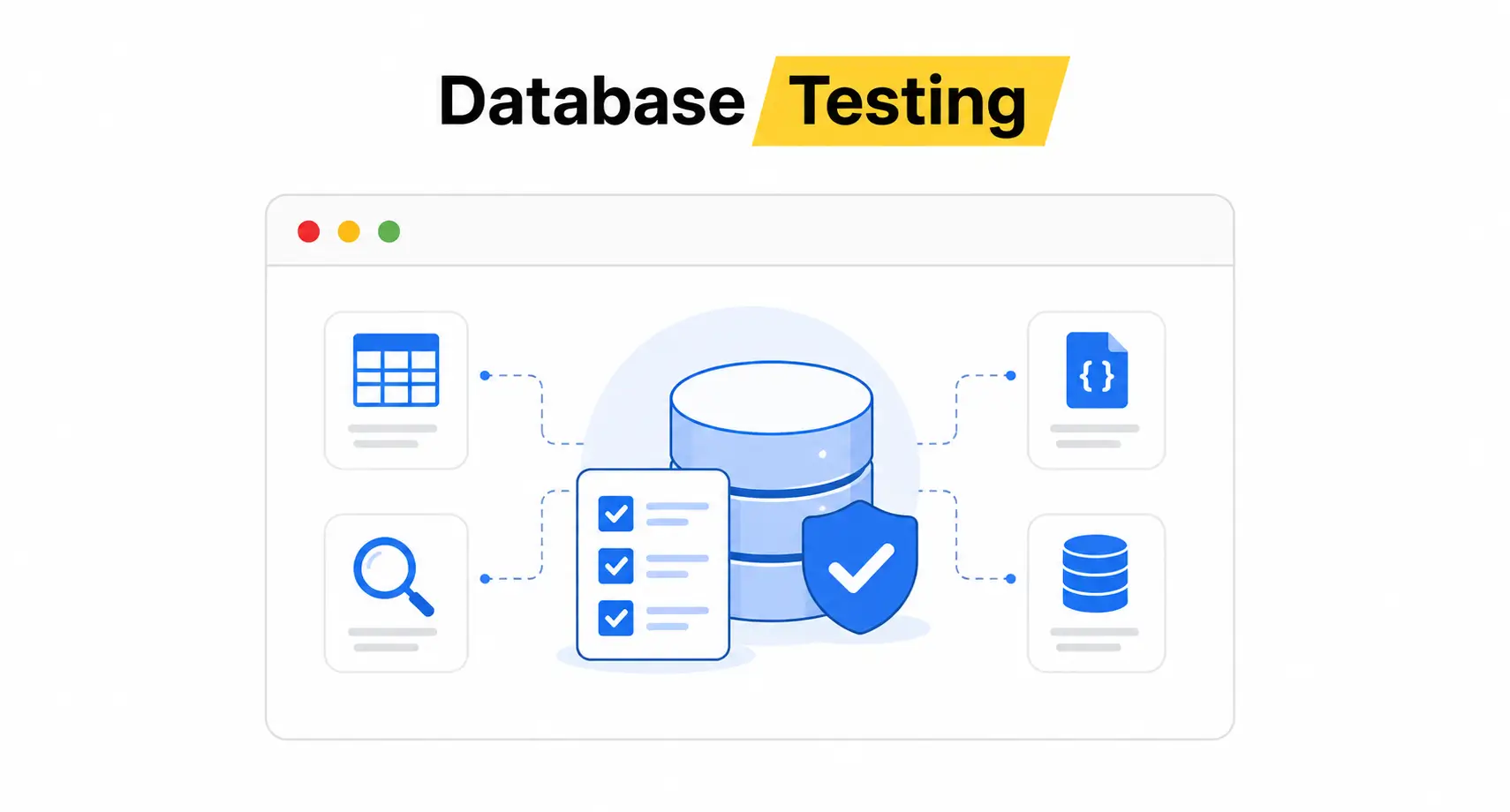
Most teams test the interface and trust the database. Data corruption then surfaces in production, where a single broken constraint damages thousands of records. Database testing catches these defects at the schema and query level, before users ever see them.
This guide covers database testing types, the testing process, worked test cases, and results from 2 real Testscenario engagements. A downloadable structure is not needed here: every section applies directly to your next release cycle.
What Is Database Testing?
Database testing is the process of validating the schema, data integrity, stored procedures, and performance of an application’s database layer.
Database testing runs behind the interface, checking what happens after every click reaches the backend tables. Practitioners call the same discipline DB testing, backend testing, or data testing.
The name database QA describes the same practice from a process angle. Database QA covers 4 focus areas:
- Data accuracy: Stored values match what users entered and what business rules require.
- Data consistency: The same record returns identical values across every query path.
- Schema validity: Tables, columns, and constraints match the data model design.
- Performance: Queries return results within defined response thresholds under expected load.
Where Does Database Testing Sit in the Application Stack?
Database testing targets the deepest of the 4 application layers. The 4 layers are:
- User interface layer: The screens and forms that users interact with directly.
- Business layer: The application logic that processes rules and calculations.
- Data access layer: The queries and APIs that move data between logic and storage.
- Database layer: The tables, schemas, triggers, and stored procedures that hold the data.
UI tests validate the first layer. Unit tests cover the second. Database testing owns the third and fourth layers, where defects hide from every screen-level check.
How Does Database Testing Differ from Data Quality Assurance?
Data quality assurance measures the data itself, while database testing validates the system that stores it. Data quality work scores records on accuracy, completeness, and consistency.
Database testing verifies that schemas, constraints, and transactions protect those records during every operation. Both disciplines overlap on data integrity, and QA teams run them together on data-heavy platforms.
The 4 focus areas above define the scope. The next question is what happens when teams skip this scope entirely.
Why Does Database Testing Matter?
Database testing matters because data defects cost more than interface defects and stay hidden longer. A broken button fails visibly on one screen. A broken constraint corrupts records silently for weeks before anyone notices.
CISQ’s 2022 report put the cost of poor software quality in the US at $2.41 trillion. Data-layer defects contribute heavily to that figure through 3 failure patterns:
- Silent corruption: Invalid data passes into reports, invoices, and downstream systems before detection.
- Cascade failures: One broken foreign key relationship breaks every feature that joins on it.
- Unrecoverable loss: Deleted or overwritten records without transaction safeguards cannot be restored.
Industry-standard benchmarks show a production defect costs 60 to 100x more to fix than one caught during design. Data defects sit at the expensive end of that range because remediation includes data repair, not just code fixes.
Risk-based prioritization inside a documented testing strategy directs the deepest database coverage to payment, authentication, and record-keeping flows.
Hidden defects raise the stakes. The comparison below shows exactly where interface checks stop and database checks begin.
Database Testing vs UI Testing
Database testing validates the data layer, while UI testing validates what users see and touch. The two disciplines catch different defect classes and require different skills. Neither replaces the other.
| Parameter | UI Testing | Database Testing |
|---|---|---|
| Common alias | Front-end testing, GUI testing | Back-end testing, data testing |
| Primary focus | Look, feel, navigation, visual elements | Data accuracy, schemas, triggers, storage integrity |
| Core skill requirement | Business workflows, UI automation tools | SQL, database engines, data models |
| Blind spot | Misses silent data truncations and duplicates | Misses visual formatting and usability defects |
| Defect visibility | Defects appear on screen immediately | Defects stay hidden until data is queried |
A form that shows a success message proves nothing about the database. In our QA engagements, records that appeared saved on screen were truncated, duplicated, or written to the wrong tenant. Only direct database validation catches that class of defect.
Catching that class requires knowing which type of database test to run. The 3 categories below organize every database test.
What Are the Types of Database Testing?
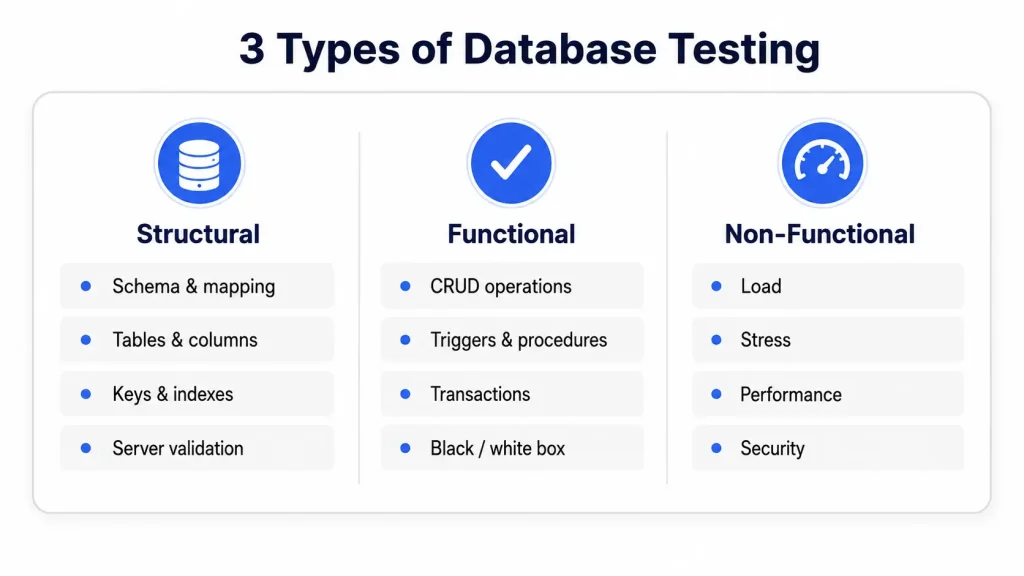
Database testing divides into 3 categories: structural testing, functional testing, and non-functional testing. Structural testing validates the storage architecture. Functional testing validates operations and business rules. Non-functional testing validates speed, scale, and security.
Structural Testing
Structural testing validates the database components that end users never access directly. Structural checks cover 4 targets:
- Schema and mapping: The back-end structure aligns with front-end fields and the data model specification.
- Tables and columns: Data types, field lengths, and naming match design, with zero unmapped or unused columns.
- Keys and indexes: Primary and foreign keys establish referential integrity, and indexes support the query patterns the application runs.
- Server validation: Database server configuration handles the authorized user actions and expected transaction volume.
A schema mismatch produces the most common structural defect. A data model specifies a 100-character name field, the table allows 80, and every longer name truncates silently.
Functional Testing
Functional testing validates that database operations deliver correct results for every business workflow. Functional coverage spans 3 areas:
- CRUD operations: Create, Read, Update, and Delete actions triggered from the application write correct data.
- Triggers and stored procedures: Auto-executing database logic fires at the right events and produces the right changes.
- Transaction behavior: Multi-step operations complete fully or roll back fully, with no partial writes.
Black box functional tests validate outcomes through the application without reading internal structures. White box tests validate the triggers, views, and procedures directly.
Non-Functional Testing
Non-functional testing validates database behavior beyond correct results. Non-functional coverage spans 4 areas:
- Load testing: Query execution speed and system responsiveness hold under peak concurrent user volumes.
- Stress testing: The database is pushed beyond normal operating limits to find its breaking point.
- Performance testing: Response times, throughput, and resource usage meet defined thresholds during sustained operation.
- Security testing: Access controls, encryption practices, and SQL injection resistance protect the data.
Data Integrity and Validation Testing
Data integrity testing verifies that data survives every operation without corruption, unexpected deletion, or unauthorized change. Validation testing confirms that inputs are checked against rules before they reach storage. Both cut across the 3 categories above. Integrity rules live in the structure, get exercised by functions, and degrade under load.
📋 ISTQB Definition: The ISTQB glossary defines database integrity testing as “testing the methods and processes used to access and manage the data(base), to ensure access methods, processes and data rules function as expected and that during access to the database, data is not corrupted or unexpectedly deleted, updated or created.”
Integrity guarantees rest on 4 transaction properties. Those properties have a name every database tester works with daily.
ACID Properties in Database Testing
ACID stands for Atomicity, Consistency, Isolation, and Durability: the 4 properties that make database transactions reliable. Every functional database test suite validates these properties directly or indirectly.
- Atomicity: A transaction completes entirely or not at all. Testing forces mid-transaction failures and verifies full rollback.
- Consistency: Every transaction moves the database from one valid state to another. Testing confirms constraints hold after every commit.
- Isolation: Concurrent transactions execute without interfering with each other. Testing runs parallel operations and checks for dirty reads and lost updates.
- Durability: Committed data survives crashes and restarts. Testing kills the database process after commit and verifies the data persists.
A payment that debits one account without crediting the other is an atomicity failure. Concurrent bookings that both claim the last seat expose an isolation failure. ACID validation turns these abstract properties into concrete pass/fail checks inside a structured workflow.
What Is the Database Testing Process?
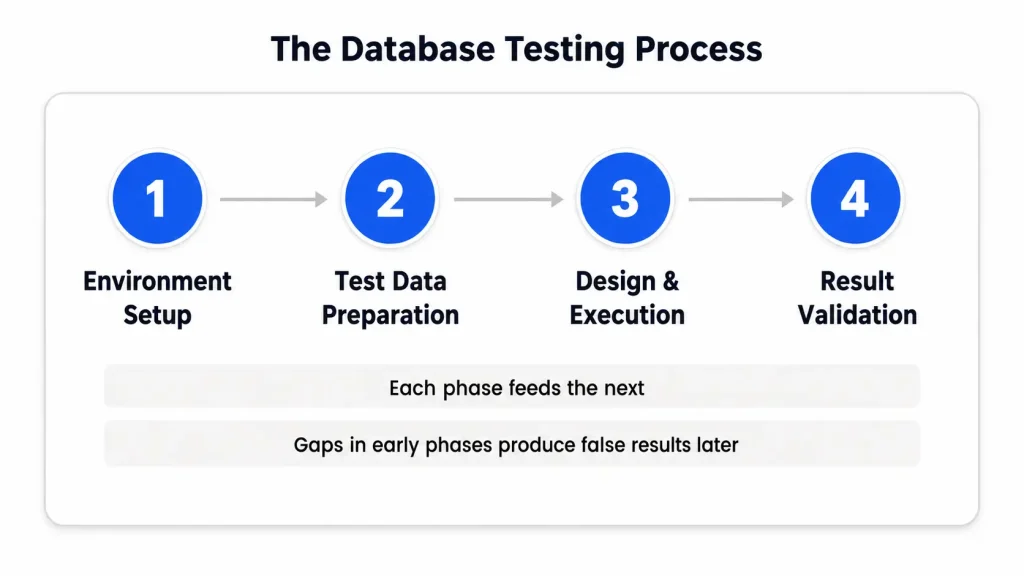
The database testing process runs through 4 phases, from environment setup to result validation. The 4 phases are environment setup, test data preparation, test case design and execution, and result validation. Each phase feeds the next, and gaps in early phases produce false results later.
Test Environment Setup
Test environment setup replicates the production database structure in an isolated instance. Replicate the same engine version, schema, constraints, stored procedures, and configuration.
Environment drift produces the most common false results: a test passes against an outdated schema and the defect ships anyway.
Test Data Preparation
Test data preparation loads the environment with data that exercises every rule the tests target. Test data comes from 2 sources:
- Synthetic generation: QA creates artificial data sets covering boundary values, invalid inputs, and edge conditions without any privacy risk.
- Masked production data: Production data is copied and anonymized before use, preserving realistic volumes and distributions.
Data volume decides what the suite catches. A suite that runs against 500 clean rows misses defects that appear at 5 million mixed rows.
Test Case Design and Execution
Test case design maps every schema rule, workflow, and threshold to a specific check with an expected result. Design follows the coverage priorities set in the test planning document for the release.
Execution runs SQL validation scripts, application-driven scenarios, and automated suites against the prepared environment.
Result Validation and Defect Logging
Result validation compares actual database states against expected states after every executed case. Record mismatches as defects with the query, the actual value, and the expected value. A logged defect reads like a result interpretation: expected row count 1,000, actual 998, FAIL, 2 records lost on rollback.
Execution raises a mode question before any case runs. Which checks run through scripts, and which need human judgment?
Manual vs Automated Database Testing
Manual database testing executes SQL checks by hand, while automated database testing runs scripted validations on every build. Mature teams combine both: automation for repeatable checks, manual work for exploratory and judgment-based validation.
Automation fits 4 test categories:
- CRUD validation suites: Repetitive operation checks with predictable pass/fail outcomes.
- Schema regression checks: Structure comparisons that run after every migration or deployment.
- Data reconciliation scripts: Row counts and checksums compared across environments or systems.
- Performance baselines: Query timing measurements repeated across builds to catch degradation.
Manual testing fits 3 categories:
- Exploratory data probing: A skilled tester hunts for edge cases no script anticipated.
- Complex scenario validation: Multi-system workflows where judgment decides whether a state is correct.
- One-time migration verification: Checks that run once and never justify automation cost.
The split shifts toward automation as schemas stabilize. Whichever mode runs the check, the check itself follows the same test case structure.
Database Test Cases with Examples
A database test case pairs a specific operation with a verifiable expected database state. The 3 groups below cover the cases every data-driven application needs.
CRUD Operation Test Cases
CRUD test cases map each user action to its SQL operation and its validation query. The mapping covers 4 operations:
| User Action | SQL Operation | Validation Check |
|---|---|---|
| Saves a new record | INSERT | New row exists with correct values in every column. |
| Views or searches records | SELECT | Returned data matches stored data with correct filtering. |
| Edits an existing record | UPDATE | Changed fields hold new values, unchanged fields hold old values. |
| Removes a record | DELETE | Row is removed, and dependent records follow the defined delete rule. |
A worked UPDATE case from a multi-tenant pattern: a school administrator edits a student’s guardian phone number. The validation query selects the student row by student ID and tenant ID together.
Expected result: phone holds the new value, name and enrollment fields unchanged, tenant ID unchanged, updated_at refreshed. A changed tenant ID fails the case even when the phone updated correctly. Tenant-scoped validation queries catch cross-tenant writes that single-key lookups miss.
Schema and Constraint Test Cases
Schema test cases verify that the structure enforces the data model rules. Constraint checks follow the boundary value pattern. A worked example for an age column accepting 18 to 65:
| Partition | Test Value | Expected Result |
|---|---|---|
| Below minimum (invalid) | 17 | Rejected. |
| Minimum boundary (valid) | 18 | Accepted. |
| Maximum boundary (valid) | 65 | Accepted. |
| Above maximum (invalid) | 66 | Rejected. |
| Wrong type (invalid) | “abc” | Rejected. |
Apply this pattern to every column carrying a CHECK constraint, NOT NULL rule, or defined range.
Transaction Test Cases
Transaction test cases verify ACID behavior under failure and concurrency. A worked case from a role-based pattern: an administrator reassigns a volunteer to a new program inside one transaction.
The transaction removes the old program link, adds the new link, and updates the access scope. The test kills the connection after the removal statement. Expected result: old link intact, new link absent, access scope unchanged.
Any partial state fails the case. A volunteer stripped of one scope without gaining the next loses valid access entirely. In our QA engagements, partial permission writes produce lockouts that surface as unrelated interface bugs.
These case structures apply to every engine. The engine itself changes what the cases emphasize.
Database Testing Across Database Engines
Database testing principles stay constant across engines, while validation targets shift between relational and NoSQL systems. The engine determines which structural rules exist to test.
Testing Relational Databases
Relational database testing validates strict schemas, constraints, and joins across engines like MySQL, PostgreSQL, and SQL Server. The 3 engines differ in testable behavior:
- MySQL: Storage engine choice changes transaction support, so InnoDB tables get full ACID cases while MyISAM tables cannot.
- PostgreSQL: Rich constraint and trigger support moves more business rules into the database, expanding white box coverage.
- SQL Server: Stored procedure density in enterprise systems makes procedure and trigger validation the largest test surface.
Testing NoSQL Databases
NoSQL database testing shifts focus from schema enforcement to application-level data discipline. MongoDB and similar document stores accept flexible structures, so the database rejects far less invalid data.
Test coverage moves to 3 targets: document structure consistency, application-side validation rules, and eventual consistency behavior across replicas.
Engine knowledge shapes the test design. Client results prove what the design delivers in production conditions.
Database Testing in Real Projects
Real engagements show database testing catching defect classes that interface testing cannot reach. The 2 projects below come from Testscenario’s delivery work.
Multi-Tenant Data Integrity at Scale
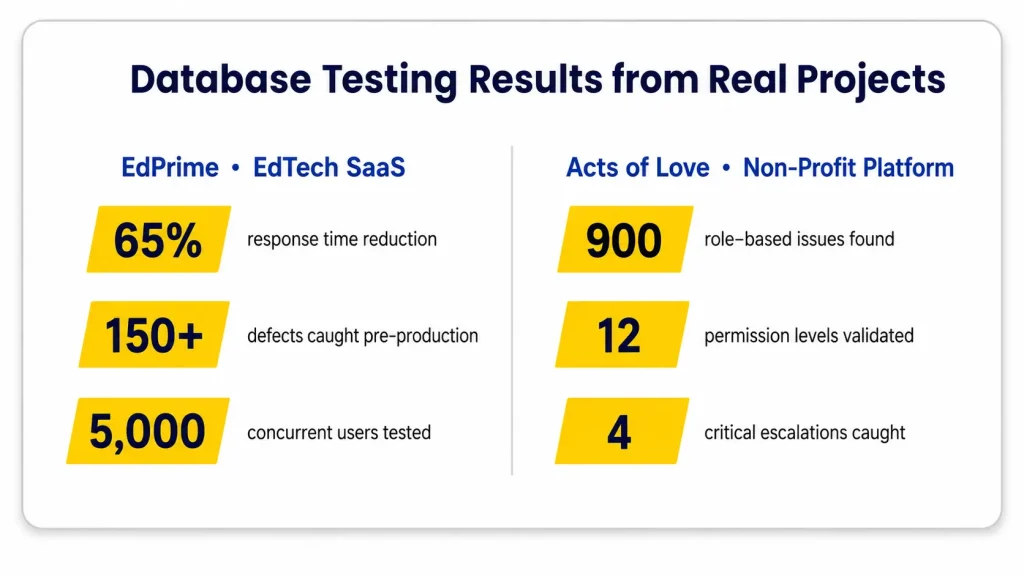
EdPrime is an edtech SaaS platform handling student data, attendance, fees, and academic reporting for schools. Peak traffic reaches 5,000 concurrent users during enrollment periods.
Multi-tenant architecture made data isolation the highest database risk: one school’s records must never surface in another school’s queries.
Database testing covered tenant isolation queries, integrity constraints across shared tables, and query performance at simulated peak load.
Testing at 5,000 concurrent sessions exposed data-layer bottlenecks that functional tests at low volume never triggered. The engagement caught 150+ defects before production and cut average response time by 65%.
Data Isolation Across Permission Levels
Acts of Love is a non-profit management platform with role-based access spanning donors, volunteers, administrators, and coordinators. Each role reads different data through the same tables, making the database layer the enforcement point for isolation.
Database validation ran every role-permission combination against direct data access checks. The work surfaced 900 role-based access issues across 12 permission levels.
Privilege escalation probing caught 4 critical scenarios where restricted users reached administrator-level data. Across our testing work, permission defects at the data layer outnumber the same defect class at the interface layer. Every interface shortcut still hits the same tables.
Both engagements validated the database as its own test target. Adjacent data disciplines draw a boundary worth naming next.
Database Testing vs ETL Testing
Database testing validates one database, while ETL testing validates data movement between systems. The two disciplines share SQL skills and differ in scope.
| Aspect | Database Testing | ETL Testing |
|---|---|---|
| Scope | One database behind one application | Extract, Transform, Load pipelines across systems |
| Primary check | Schema, operations, integrity, performance | Source-to-target data completeness and transformation logic |
| Typical context | Application QA cycles | Data warehouse and analytics projects |
| Core defect class | Corrupted or lost operational records | Dropped, duplicated, or mis-transformed rows in transit |
Teams running both disciplines share test data practices and reconciliation scripts. The tooling below serves the database side.
Database Testing Tools
Database testing tools split into SQL clients, data validation frameworks, and load generators. Tool selection follows the engine, the automation target, and the team’s stack.
| Tool | Purpose | Open Source |
|---|---|---|
| Apache JMeter | Load and performance testing through JDBC connections | Yes |
| DbUnit | Database state setup and verification for Java test suites | Yes |
| tSQLt | Unit testing framework for SQL Server procedures and functions | Yes |
| Datagaps DataOps Suite | Automated data validation and reconciliation at volume | No |
| Navicat | Query building, data comparison, and administration across engines | No |
Selection follows 3 criteria: native engine support, build pipeline integration, and team productivity within 2 weeks. A tool meeting 2 of 3 criteria loses to a simpler tool meeting all 3.
Pipeline integration is where these tools earn their cost. The next section covers that integration.
Database Testing in CI/CD Pipelines
Database tests in CI/CD (Continuous Integration/Continuous Delivery) pipelines run automatically on every build and block deployment on failure. Pipeline placement turns database validation from a release-phase event into a continuous quality gate.
Database checks map to 3 pipeline stages:
- Build stage: Schema validation scripts confirm migrations applied cleanly before any functional test runs.
- Test stage: Automated CRUD, integrity, and reconciliation suites execute against a fresh environment on every merge.
- Pre-deployment stage: Performance baselines and data comparison checks gate the promotion to production.
Regression suites at the data layer pair naturally with API-level checks. API validation exercises the same backend paths from one layer up. Teams building this coverage from scratch shorten the setup with an established test automation partner.
Pipelines expose the recurring obstacles fast. The 4 challenges below appear in most database testing programs.
Common Database Testing Challenges
4 challenges recur across database testing programs: environment parity, SQL skill gaps, test data management, and migration validation. Each has a working countermeasure.
- Environment parity: Test databases drift from production schemas, producing false passes and false failures. Automated schema comparison on every deployment closes the drift.
- SQL skill gaps: Database validation concentrates on 1-2 skilled testers while the rest of the team waits. Query template libraries spread the capability across the team.
- Test data management: Stale or undersized data sets miss volume-dependent defects. Scheduled refresh cadences with masked production data keep sets realistic.
- Migration validation: Schema changes and data migrations carry the highest corruption risk of any database event. Dedicated migration test cases with row counts and checksums verify every move.
Countermeasures work best as standing practice rather than one-time fixes. The practices below hold programs steady between releases.
Database Testing Best Practices
Effective database testing programs follow 6 practices that separate reliable coverage from ad hoc checking.
- Write validation queries independent of the application code, so application bugs cannot mask data bugs.
- Test boundary values on every constrained column, using the partition table pattern shown above.
- Run integrity checks after every migration, deployment, and bulk operation without exception.
- Keep test data refreshed on a fixed cadence, matched to production volume and distribution.
- Automate every check that runs more than 5 times per cycle with stable inputs.
- Log defects with the query, expected value, and actual value, making every failure reproducible.
Broader delivery-level guidance sits in our testing practices guide, which covers the process side these 6 practices plug into. The questions below close the remaining gaps teams ask about most.
Frequently Asked Questions About Database Testing
These questions come up most often when teams plan database validation coverage.
1. What Is a QA Database?
A QA database is the database instance inside the test environment, not a testing practice. The QA database mirrors production structure and holds test data. Database testing is the activity, and the QA database is where the activity runs.
2. Is SQL Required for Database Testing?
Yes, SQL is required for database testing because validation queries are the core testing instrument. SQL is the tool, not the test. Testers verify states with SELECT, INSERT, UPDATE, and DELETE statements plus schema inspection commands. Automation frameworks generate some queries, and testers still read and adapt them.
3. Can Selenium Be Used for Database Testing?
Yes, Selenium supports database testing indirectly through JDBC connections in the same test code. Selenium drives the UI action, and the JDBC query validates the resulting database state in one flow. Teams running Selenium-based automation add these backend assertions to existing UI suites without a separate framework.
4. Can Playwright Perform Database Testing?
Yes, Playwright performs database validation through direct database client calls inside test scripts. Playwright tests run in Node.js, Python, or Java, and each runtime connects to the database natively. Teams extending Playwright automation coverage validate UI actions and backend states inside one test.
5. Who Performs Database Testing?
QA engineers with SQL proficiency perform most database testing, supported by developers on white box cases. QA owns CRUD validation, integrity checks, and data reconciliation. Developers own stored procedure unit tests and trigger logic. Database administrators support environment setup and performance baselining.
 13 Oct 2026