What Is Automation Testing in Software QA

Rimpal MistryCo-Founder & VP Operations
 08/06/2026
Automation testing is a core practice in software quality assurance. QA teams use automation testing to verify application behavior through tools and scripts instead of manual execution. Understanding how automation testing works is the first step toward evaluating the right testing approach for any software product.
What Is Automation Testing?
Automation testing is a software testing technique that uses tools and scripts to execute predefined test cases. The technique eliminates manual effort from repetitive test execution. Automation testing compares actual results against expected outcomes and flags defects automatically.
According to the ISTQB Foundation Level Syllabus, test automation involves using software to control test execution, compare outcomes, and report results. Automation testing applies this principle across 6 distinct testing types: unit, integration, functional, regression, performance, and end-to-end.
A login page demonstrates how automation testing operates in practice. A manual tester enters a username and password, clicks the submit button, and verifies the result. An automated test script performs the same 3 actions across 500 input combinations in under 60 seconds. The script records every pass and failure without human oversight.
Automation testing does not replace all forms of manual testing. Exploratory testing, usability evaluation, and visual design review require human judgment. Automation testing targets the scripted, repeatable checks that consume the most manual effort.
The automation testing technique follows a structured 7-step process from test identification to continuous integration.
How Does Automation Testing Work?
Automation testing works by translating manual test steps into executable scripts. A testing tool runs these scripts against the application. The tool captures results and generates pass/fail reports after each execution.
What Is the Automation Testing Process Step by Step?
The automation testing process is a 7-step sequence from test identification through continuous integration.
- Identify test scope. Select the test cases with the highest automation return: regression suites, smoke tests, and data-heavy validations.
- Select the framework. Choose a framework architecture that matches the project: data-driven, keyword-driven, or behavior-driven (BDD).
- Develop test scripts. Write scripts in the language the automation tool supports, such as Java, Python, C#, or JavaScript.
- Configure the test environment. Set up the machines, browsers, devices, and test data the scripts require for execution.
- Execute the test suite. Run the scripts through the automation tool. Execution triggers on a schedule, on demand, or through a CI/CD pipeline after each code commit.
- Analyze test results. Review pass/fail logs, identify failed assertions, and trace failures to specific defects in the application code.
- Integrate with CI/CD. Connect the automated test suite to the build pipeline. Every code change triggers the test suite automatically. Continuous testing catches defects within minutes of introduction.
The 7-step process transforms testing from a manual checkpoint into a continuous validation layer. Continuous validation runs alongside development, not after it.
Automation testing applies this process across 6 distinct testing types, each targeting a different layer of the application.
What Are the 6 Types of Automation Testing?
Automation testing covers 6 types: unit, integration, functional, regression, performance, and end-to-end. Each type validates a different scope within the application. The 6 types operate at layers from individual functions to complete user workflows.
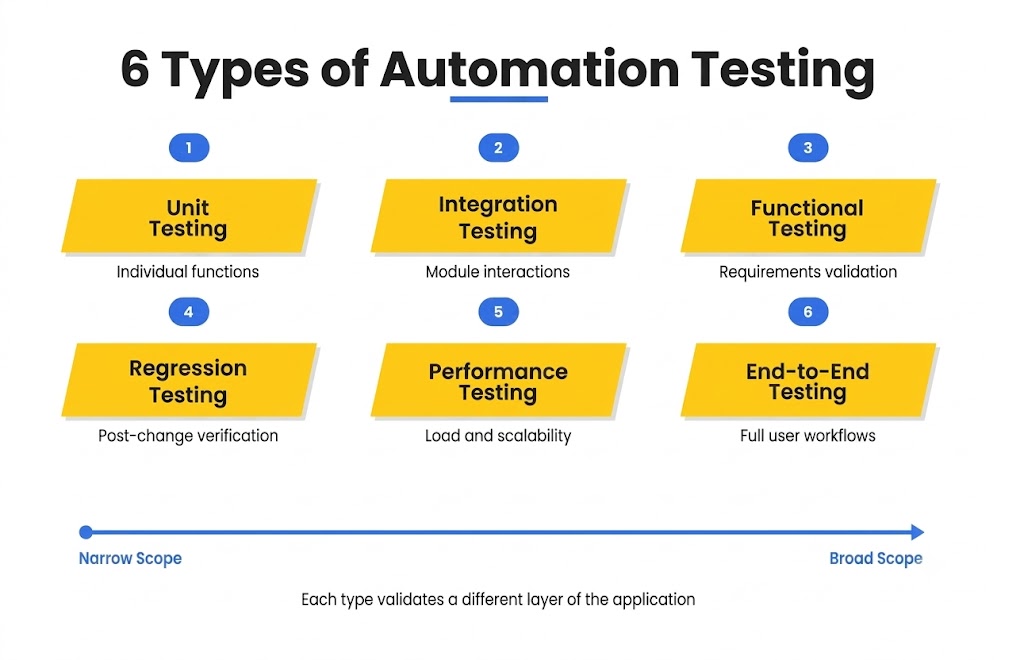
- Unit testing validates individual functions or methods in isolation. Unit tests check that a single code unit returns the correct output for a given input. Developers run unit tests after every code change, typically hundreds of times per day.
- Integration testing validates the interaction between 2 or more connected modules. Integration tests catch defects that unit tests miss: data format mismatches, incorrect API responses, and broken communication between services. Automating integration tests ensures that module-level changes do not break neighboring components.
- Functional testing validates application behavior against specified requirements. Functional tests confirm that login forms accept valid credentials, search filters return correct results, and payment flows complete transactions. Automation executes functional tests across hundreds of input combinations at a speed manual testing cannot match.
- Regression testing validates that new code changes do not break existing functionality. Regression tests rerun the full test suite after every update, patch, or feature addition. Regression testing is the highest-value automation candidate because the same tests execute repeatedly across every release cycle.
- Performance testing validates application responsiveness, stability, and scalability under load conditions. Performance tests simulate thousands of concurrent users to measure response times, throughput, and resource consumption. Automating performance tests through tools like JMeter and Gatling enables continuous monitoring against performance benchmarks.
- End-to-end testing validates complete user workflows from start to finish. End-to-end tests simulate real user scenarios across the full application stack: UI, API, database, and third-party integrations. Automated end-to-end tests confirm that the entire system functions as a connected whole, not as isolated components.
What Is the Difference Between Unit Testing and Integration Testing?
Unit testing validates a single function in isolation from all other code. Integration testing validates the connection and data flow between 2 or more functions that operate together. Unit tests run faster and catch logic errors. Integration tests run slower and catch communication errors between modules.
Each of the 6 testing types delivers specific benefits when automated. The combined benefits of automation testing compound across the full testing lifecycle.
What Are the Benefits of Automation Testing?
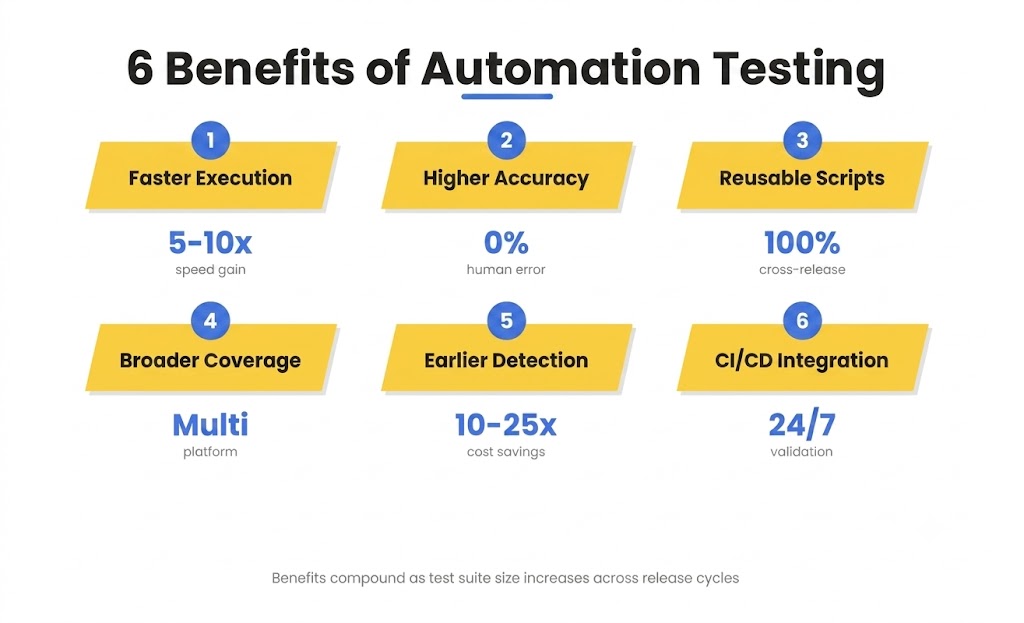
Automation testing delivers 6 measurable benefits: faster execution, higher accuracy, reusable scripts, broader coverage, earlier defect detection, and CI/CD integration. These 6 benefits compound over time as the test suite grows.
Faster execution speed
Automated test suites execute 5 to 10 times faster than equivalent manual test cycles. A regression suite that takes 8 hours manually runs in under 45 minutes through automation.
Testscenario’s QA engagement with EdPrime demonstrated this speed gain. Automated performance tests reduced API response times from 3.5 seconds to 1.2 seconds. That 65% reduction in response time supported 5,000 concurrent users during peak admission seasons.
Higher test accuracy
Automated tests eliminate human error in repetitive execution. Every test runs with identical steps, identical data, and identical assertions. Consistent execution removes the variability that manual testers introduce over long testing sessions.
Reusable test scripts
A script written for one release cycle runs in every subsequent cycle with minimal modification. Script reuse reduces the cost per test execution with each additional run. Reusable scripts scale across projects that share technology stacks.
Broader test coverage
Automation testing covers thousands of test cases across multiple browsers, devices, and operating systems simultaneously. Manual testing teams cannot match this coverage volume within release deadlines. Increased coverage volume surfaces defects that limited manual passes miss.
Earlier defect detection
Automated tests in a CI/CD pipeline catch defects within minutes of the code commit that introduced them. Earlier detection reduces the cost of fixing defects. Defects found in development cost 10 to 25 times less to fix than defects found in production. IBM Systems Sciences Institute research confirms this cost multiplier.
Testscenario’s 3-month engagement with EdPrime surfaced and resolved 150 critical bugs across enrollment, grading, and attendance workflows. Automated regression suites caught these defects before each release reached school administrators.
CI/CD integration
Automation testing embeds directly into build pipelines through tools like Jenkins, GitHub Actions, and GitLab CI. Pipeline integration makes testing a continuous process, not a phase. Continuous testing validates every code change before it reaches staging or production.
Is Automation Testing Faster Than Manual Testing?
Yes. Automation testing executes predefined test suites at speeds manual testing cannot approach. A 500-case regression suite runs in under 1 hour with automation. The same suite requires 3 to 5 days of manual execution by a team of 4 testers.
Speed and coverage benefits apply to specific test categories. Not all tests benefit equally from automation.
Which Tests Are Best Suited for Automation?
The 4 strongest automation candidates are regression tests, smoke tests, data-driven tests, and cross-browser tests. The 3 weakest candidates are exploratory, usability, and ad-hoc tests. A structured decision framework separates high-return targets from low-return ones.
Automate these 4 test categories:
- Regression tests. Same tests execute after every release. High frequency and full repeatability make regression the top automation candidate.
- Smoke tests. Critical-path validations run after every build. Smoke tests confirm the application’s core functions before deeper testing begins.
- Data-driven tests. A single test script runs against hundreds or thousands of input datasets. Automation processes these datasets in minutes.
- Cross-browser and cross-device tests. The same test executes across 10 or more browser and device combinations. Manual execution across all combinations is impractical within sprint timelines.
Keep these 3 test categories manual:
- Exploratory tests. Unscripted investigation depends on human curiosity and contextual judgment. Scripts cannot replicate the adaptive reasoning exploratory testing requires.
- Usability tests. Subjective evaluation of user experience, layout clarity, and interaction quality requires human perception. No automation tool measures user satisfaction.
- Ad-hoc tests. One-time, non-repeatable tests have zero reuse value. Writing automation scripts for tests that run once produces negative ROI.
The decision to automate any test depends on 4 criteria: execution frequency, test case stability, data volume, and result objectivity. Tests scoring high on all 4 criteria are strong automation candidates. Tests scoring low on 2 or more criteria belong in manual execution.
What Tests Are Not Suitable for Automation?
Tests that depend on subjective human judgment are not suitable for automation. Exploratory testing, usability evaluation, and visual design review require perception, creativity, and adaptive reasoning. Automation tools execute scripted assertions against predefined expected results. These tools cannot evaluate subjective qualities like intuitiveness, aesthetic appeal, or user satisfaction.
The framework used for automation determines how test scripts are structured, maintained, and scaled.
What Automation Testing Frameworks Exist?
Automation testing uses 6 framework types: linear, modular, data-driven, keyword-driven, BDD, and hybrid. Each framework defines how scripts are organized and how test data is managed. Framework selection depends on project complexity, team skill, and maintenance budget.
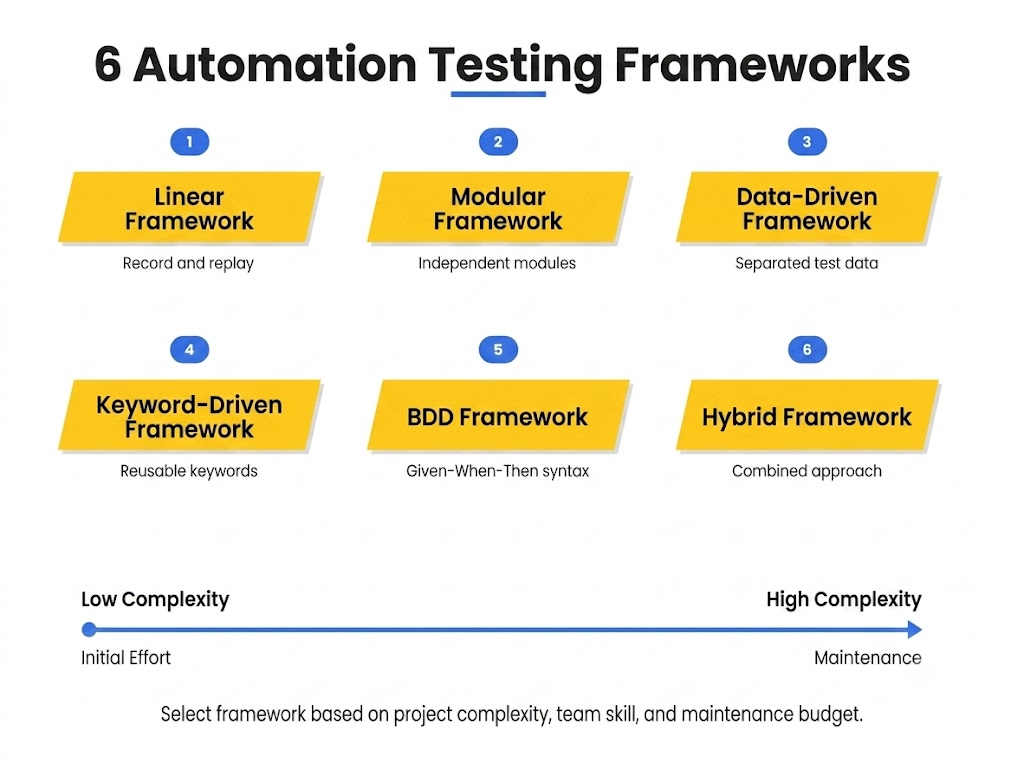
- Linear frameworks record and replay test steps in sequence. Linear frameworks require the least technical skill. Test maintenance costs increase as the application changes, because every recorded step requires re-recording.
- Modular frameworks divide the application into independent modules. Each module has its own test scripts. Modular frameworks reduce duplication because shared components are tested once and reused across modules.
- Data-driven frameworks separate test logic from test data. A single script executes against multiple datasets stored in external files: CSV, Excel, or database tables. Data-driven frameworks maximize coverage with minimal script count.
- Keyword-driven frameworks abstract test actions into reusable keywords. Keywords represent actions like “login,” “search,” and “submit.” Non-technical team members create tests by combining keywords without writing code.
- Behavior-driven development (BDD) frameworks express tests in natural language using Given-When-Then syntax. BDD frameworks like Cucumber and SpecFlow bridge the gap between business requirements and test automation. Stakeholders read and validate test scenarios without technical knowledge.
- Hybrid frameworks combine elements from 2 or more framework types. A hybrid framework pairs data-driven data management with keyword-driven abstraction. Hybrid frameworks offer flexibility at the cost of higher initial setup complexity.
What Is a Data-Driven Testing Framework?
A data-driven testing framework is an automation architecture that separates test scripts from test data. The framework reads input values from external sources like CSV files, Excel spreadsheets, or databases. One script executes the same test logic across hundreds of data combinations. Data-driven frameworks maximize test coverage while minimizing the number of scripts to maintain.
Framework architectures are evolving in 2026. AI-powered capabilities are changing how automation scripts are created, maintained, and executed.
How Does AI Change Automation Testing in 2026?
AI transforms automation testing in 2026 through 3 capabilities: self-healing scripts, AI-generated test cases, and visual AI testing. These 3 capabilities target the largest cost centers in traditional automation. AI-powered testing reduces the manual effort required to maintain and expand test suites.
- Self-healing test scripts detect when UI elements change location, name, or structure. The AI model updates element locators automatically without manual script modification. Self-healing eliminates the leading cause of flaky tests: broken selectors after UI updates. Tools like Testim, Healenium, and Katalon AI implement self-healing in production today.
- AI-generated test cases analyze application code, user behavior data, and requirement documents to produce test scenarios automatically. Generated test cases cover paths that human testers overlook: edge cases, negative scenarios, and uncommon input combinations. AI test generation reduces requirement-to-test time by 40 to 60%. Katalon’s 2025 State of Software Quality report documents this reduction.
- Visual AI testing compares application screenshots pixel by pixel across browsers, devices, and viewport sizes. Visual AI detects layout shifts, font rendering errors, overlapping elements, and color changes that functional assertions miss. Applitools Eyes and Percy by BrowserStack are the leading visual AI testing platforms in 2026.
AI does not replace the QA engineer’s role in automation testing. AI handles the repetitive, pattern-based work: selector maintenance, test generation, and visual comparison. QA engineers focus on test strategy, risk assessment, and exploratory investigation. The combination of AI capabilities with human judgment produces automation coverage that neither achieves independently.
What Are the Common Challenges in Automation Testing?
Automation testing presents 5 common challenges: high initial investment, script maintenance, tool selection, flaky tests, and skill gaps. These 5 challenges affect every team that adopts automation testing.
- High initial investment. Automation requires upfront spending on tool licenses, framework setup, and script development before any tests execute. The return on investment materializes after 3 to 6 months of repeated test execution.
- Script maintenance cost. Application changes break existing test scripts. UI redesigns, API modifications, and database schema changes require script updates. Maintenance effort grows proportionally with suite size. Teams that skip regular maintenance accumulate technical debt in their test suites.
- Tool selection complexity. The automation testing tool market includes 50 or more active products across open-source and commercial categories. Selecting the wrong tool creates migration costs, licensing friction, and capability gaps. Tool selection requires evaluation against 4 criteria: technology stack compatibility, team skill level, integration support, and scaling requirements.
- Flaky test management. Flaky tests pass on one execution and fail on the next without any code change. Flaky tests erode team confidence in the automation suite. Common flaky test causes include timing dependencies, environment inconsistencies, and non-deterministic data. Eliminating flaky tests requires systematic root cause analysis and infrastructure stabilization.
- Automation skill gap. Automation testing requires programming proficiency, framework knowledge, and CI/CD pipeline experience. Teams transitioning from manual-only testing face a learning curve of 3 to 6 months for core automation skills.
Is Automation Testing Easy or Hard to Learn?
No. Automation testing requires programming knowledge in at least 1 language: Java, Python, JavaScript, or C#. Learning the language takes 2 to 4 months. Learning a framework like Selenium, Playwright, or Cypress takes an additional 1 to 3 months. Total ramp-up time for a manual tester transitioning to automation ranges from 3 to 6 months with dedicated practice.
How Does Automation Testing Fit in Agile and DevOps?
Automation testing operates as the continuous validation layer in Agile and DevOps workflows. Agile teams run automated tests at the end of every sprint. DevOps pipelines trigger automated tests after every code commit.
Agile development cycles deliver new features every 1 to 4 weeks. Manual testing cannot keep pace with this release frequency at scale. Automation testing executes the full regression suite within hours, providing the fast feedback Agile velocity demands. Sprint retrospectives use automation test results to identify recurring defect patterns and adjust development priorities.
DevOps extends automation testing into the deployment pipeline. Continuous testing validates code at every stage: build, staging, and pre-production. A code commit triggers the automated suite through Jenkins, GitHub Actions, or GitLab CI. Passing tests advance the build to the next stage. Failing tests block the deployment and alert the engineering team. This feedback loop keeps defective code out of production environments.
Testscenario integrates automation testing into Agile and DevOps workflows for clients across SaaS, fintech, travel tech, and e-commerce. Learn more about our Automation Testing Services and how they fit into your development pipeline.
Which Automation Testing Tools Are Most Used?
The 5 most used automation testing tools in 2026 are Selenium, Playwright, Cypress, Appium, and JMeter. Each tool targets a different testing layer. The 5 tools span web UI, cross-browser, JavaScript, mobile, and performance testing.
- Selenium is the most adopted open-source framework for web browser automation. Selenium supports Java, Python, C#, JavaScript, and Ruby. Selenium WebDriver interacts directly with browser APIs for fast, reliable execution. Learn more about Selenium Automation Testing and how it integrates into QA workflows.
- Playwright is a cross-browser automation framework developed by Microsoft. Playwright supports Chromium, Firefox, and WebKit with a single API. Built-in auto-waiting and parallel execution make Playwright a strong choice for CI/CD integration. Explore Playwright Automation Testing for web applications.
- Cypress is a JavaScript-native testing framework built for front-end developers. Cypress runs tests inside the browser with real-time reloading and time-travel debugging. Cypress excels at component testing and end-to-end testing for JavaScript applications. See how Cypress Automation Testing fits into modern front-end workflows.
- Appium is an open-source framework for mobile application automation on Android and iOS. Appium uses the same WebDriver protocol as Selenium, enabling teams to reuse web testing skills for mobile testing. Explore Mobile Automation Testing with Appium for cross-platform mobile QA.
- JMeter is an open-source tool for performance and load testing. JMeter simulates thousands of concurrent users to measure application response times, throughput, and error rates. Teams pair JMeter with functional automation tools to cover both correctness and performance in the testing pipeline. Explore Performance Testing for load and scalability validation.
What AI-Native Automation Tools Are Emerging in 2026?
AI-native tools generate, execute, and maintain tests without manual scripting. Three tools lead this category.
- Testsigma: Agentic test automation platform. Five AI agents handle test generation, execution, failure analysis, self-healing, and suite optimization. Tests are written in plain English. Supports web, mobile, desktop, API, and Salesforce.
- testRigor: Generative AI test automation. Tests are written in plain English commands. No element locators needed. The AI identifies elements from screen context.
- TestMu AI (formerly LambdaTest): Cloud testing infrastructure with KaneAI, a GenAI testing agent. 10,000+ real devices. Supports Selenium, Playwright, Cypress, and Appium test execution at scale.
How Does Automation Testing Compare to Manual Testing?
Automation testing and manual testing serve different purposes within a QA strategy. Automation testing handles the high-volume, repeatable, data-intensive tests that require speed and consistency. Manual testing handles the subjective, exploratory, and one-time tests that require human judgment and creativity.
The strongest testing strategies combine both approaches. Automation covers the regression, smoke, and cross-browser layers. Manual testing covers the exploratory, usability, and ad-hoc layers. The ratio between automation and manual effort depends on the project’s release frequency, application complexity, and team composition.

 16 Jan 2023


