Salesforce UAT Testing: Process, Template, and Best Practices

Rimpal MistryCo-Founder & VP Operations
 17/08/2026
A Salesforce implementation passes every technical test and still fails on launch day. The sales team opens the new pipeline view, hits 12 clicks for a simple update, and goes back to spreadsheets.
Salesforce User Acceptance Testing (UAT) is the final validation phase where business users test Salesforce workflows against real business requirements before go-live. UAT runs in a sandbox with realistic data. Sign-off from business stakeholders closes the phase and clears deployment.
Quick answers before the full guide:
- Who runs it: Business users execute, a business analyst coordinates, one named owner signs off.
- Where it runs: A Partial Copy or Full Copy sandbox seeded with masked production data.
- How long it takes: 1 to 3 weeks for an implementation, 3 to 5 days for a release regression.
- The deliverable: A signed acceptance record against written criteria.
Download the Salesforce UAT testing template: a free .xlsx with 24 ready scenarios, a profile coverage matrix, a defect log, and a sign-off record, no email required.
This guide covers each phase in sequence. You get the testing order, the 7-step process, and sandbox setup with login. Tester roles, the filled template, release cadence, challenges, and practices follow.
Why Does Salesforce UAT Decide Go-Live Success?
Salesforce UAT decides go-live success because it is the only test phase that measures user adoption risk. Functional tests confirm the system works. UAT confirms the system works for the people who use it daily.
What Happens When Teams Skip UAT
Skipping UAT sends unvalidated workflows straight into the hands of daily users. The failure pattern repeats across implementations:
- Users reject the system: Confusing layouts and extra clicks push teams back to spreadsheets and side channels.
- Pipeline data decays: Records go unlogged, and reports stop reflecting reality within weeks.
- Leadership loses visibility: The dashboards the implementation promised show incomplete data.
- Fixes cost more: A sandbox fix takes hours, and a production fix takes re-training, deployment windows, and rebuilt trust.
What UAT Catches That Technical Testing Misses
UAT catches defects that live between the system and the user, not inside the code. Technical testing has no visibility into 4 defect classes:
- Usability gaps: The 12-click update that passes every functional check and fails every user.
- Process misalignment: A workflow built to the spec, where the spec missed how the team sells.
- Missing field data: A required report field that nobody configured because no requirement named it.
- Role-specific breakage: A flow that works for the admin profile and errors for the sales profile.
How UAT Drives User Adoption
UAT drives adoption by involving the eventual users before launch instead of after it. Testers who shaped the system defend the system. Their feedback removes friction points while changes are still cheap. Their sign-off converts skeptics into internal champions, because the approval came from their own ranks.
Adoption risk becomes measurable once you know where UAT sits in the wider testing sequence.
Where Does UAT Fit in the Salesforce Testing Sequence?
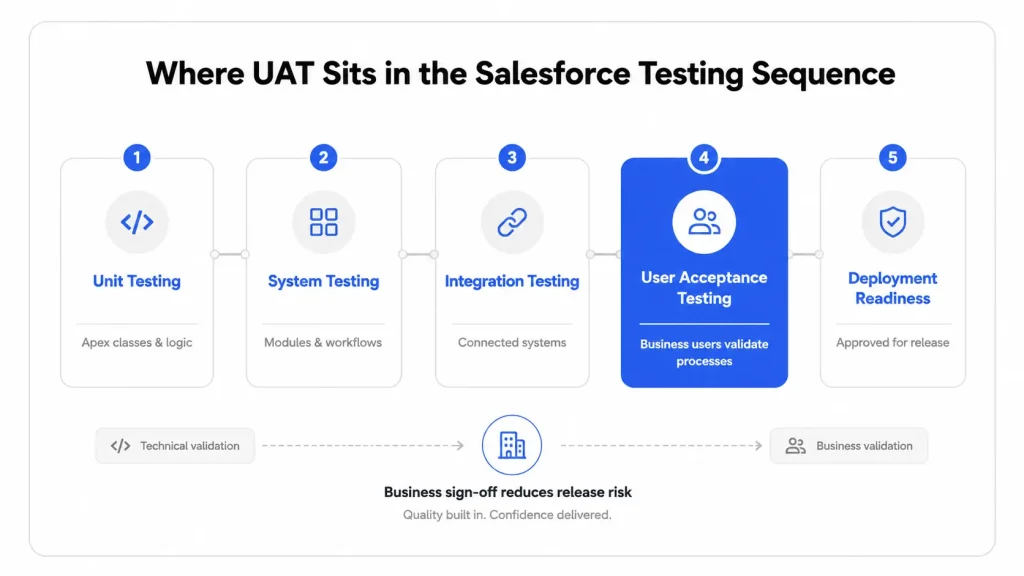
UAT is the final test level in the Salesforce testing sequence, after unit testing and system testing. Developers run unit tests on Apex code. QA engineers run system and integration tests. Business users then run UAT before deployment.
The Salesforce Testing Levels in Order
Salesforce testing moves through 4 levels, each answering one question:
- Unit testing: Developers verify that individual Apex classes and triggers execute correctly.
- System testing: QA engineers verify that configured modules work together inside the org.
- Integration testing: QA engineers verify data exchange with connected systems such as billing or marketing platforms.
- User acceptance testing: Business users verify that the complete system supports daily business processes.
📋 ISTQB Definition: The ISTQB glossary defines user acceptance testing as “acceptance testing carried out by future users in a (simulated) operational environment focusing on user requirements and needs.”
UAT vs Functional Testing: Key Differences
UAT and functional testing overlap in scope but differ in purpose. The comparison below separates them across 7 aspects:
| Aspect | Functional Testing | Salesforce UAT |
|---|---|---|
| Core question | Does the feature work as specified? | Does the system support the business process? |
| Performed by | QA engineers | Business users and stakeholders |
| Test basis | Technical requirements | Business requirements and user journeys |
| Test data | Simulated records | Masked production-like data |
| Environment | Developer or QA sandbox | UAT sandbox mirroring production |
| Timing | During development and QA | After system testing, before go-live |
| Outcome | Defect report | Formal sign-off decision |
What Comes First, UAT or QA?
QA activities come first, and UAT closes the cycle. Unit, system, and integration testing filter out technical defects before business users ever log in. UAT then validates fitness for daily work on a technically stable build. Running UAT on an unstable build wastes tester time on defects QA catches cheaper.
🔄 Looking for the technical testing side? Apex unit tests, API integration checks, and data migration validation belong to technical Salesforce testing. Business-user validation is the focus of this guide.
The sequence defines when UAT happens. The 7 steps below define how to run it.
How Do You Run Salesforce UAT Step by Step?
Salesforce UAT runs in 7 steps: scope definition, sandbox preparation, scenario writing, tester assignment, execution, defect triage, and formal sign-off.
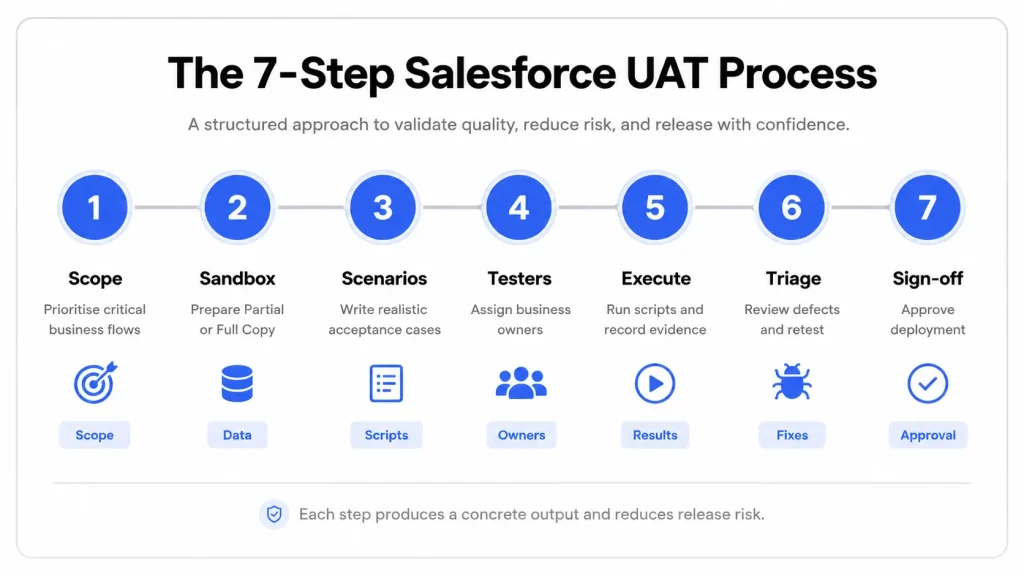
Each step produces one concrete output. Skipping a step is the most common cause of failed sign-offs.
Step 1: Define Scope and Acceptance Criteria
Scope definition names the business processes under test and the conditions for passing. List the in-scope processes, such as lead conversion or quote approval. Write one measurable pass condition per process. Name a single sign-off owner in writing.
We open every facilitation engagement with this document, before any sandbox work starts. Unowned UAT drifts: scope grows mid-execution, and sign-off turns into a negotiation. A named owner on page one prevents both.
Output: A one-page scope document with named processes, pass conditions, and the sign-off owner.
Step 2: Prepare the UAT Sandbox
Sandbox preparation builds the environment testers work in. Select the sandbox type, seed masked production data, and configure permission sets that match real user profiles. Refresh the sandbox at kickoff so configuration matches current production. Full sandbox guidance follows in the next section.
Output: A refreshed sandbox with realistic data and production-matched profiles.
Step 3: Write Test Scenarios From User Journeys
Scenario writing translates business processes into testable tasks. Describe each scenario in business language: “convert a qualified lead to an opportunity.” Avoid click-level instructions in the scenario title. Journey-based scenarios feed directly into the UAT template covered later.
The business-language rule came from watching testers stall. Click-scripts break the moment a layout changes, and testers stop to ask which button. A task phrased as the job they do daily needs no instructions.
Output: One template row per scenario, with test data and profile named.
Step 4: Assign Testers by Role and Profile
Tester assignment maps each scenario to the people who run that process in production. Cover every profile the process touches: manager, sales representative, service agent, and admin. Give each tester a fixed 2-hour block with prepared scenarios. Profile coverage prevents the permission failures described later in this guide.
The 2-hour block is a deliberate ceiling, not a limitation. Longer windows invite deferral, and deferred testing becomes launch-week testing. A calendar block with scenarios attached gets honored the way meetings get honored.
Output: A tester roster with profiles, scenarios, and scheduled blocks.
Step 5: Execute and Log Results
Execution converts scenarios into recorded evidence. Testers mark pass or fail per scenario in the template. Defect logs capture 3 required details: a screenshot, the record ID, and the profile used. Encourage notes on friction even when a scenario technically passes.
Output: A completed template with statuses and complete defect records.
In our QA engagements, this step breaks down more often than any other. Testers log “quote failed” without the record ID or profile name, and triage stalls for days.
Step 6: Triage, Fix, and Retest
Triage sorts defects by severity and routes them to fixes. Blockers stop go-live until resolved and retested. Minor issues ship with a documented known-issue note. Retest every fixed scenario under the same profile that failed it.
Output: A defect log with severities, resolutions, and retest confirmations.
Step 7: Obtain Formal Sign-Off
Sign-off closes UAT with a written decision against the step 1 criteria. The sign-off owner reviews results, confirms every criterion, and approves in writing. Verbal go-lives do not count. The signed record becomes the audit trail for the release.
Our engagements end with a one-page acceptance record. Criteria sit on the left, evidence references on the right, signature at the bottom. Disputes about what was approved end when that page exists.
Output: A signed acceptance document referencing the scope criteria.
Step 2 deserves its own section, because sandbox choice shapes everything downstream.
Which Sandbox Does Salesforce UAT Need?
Salesforce UAT needs a Partial Copy or Full Copy sandbox, because both contain production data alongside metadata. Developer sandboxes copy metadata only. Realistic records are a UAT requirement, not a preference.
What Is a UAT Sandbox?
A UAT sandbox is an isolated copy of the production Salesforce org where business users validate changes safely. The sandbox replicates configuration, automation, and permissions. Testers work against production-like records without any risk to live data.
Partial Copy vs Full Copy for UAT
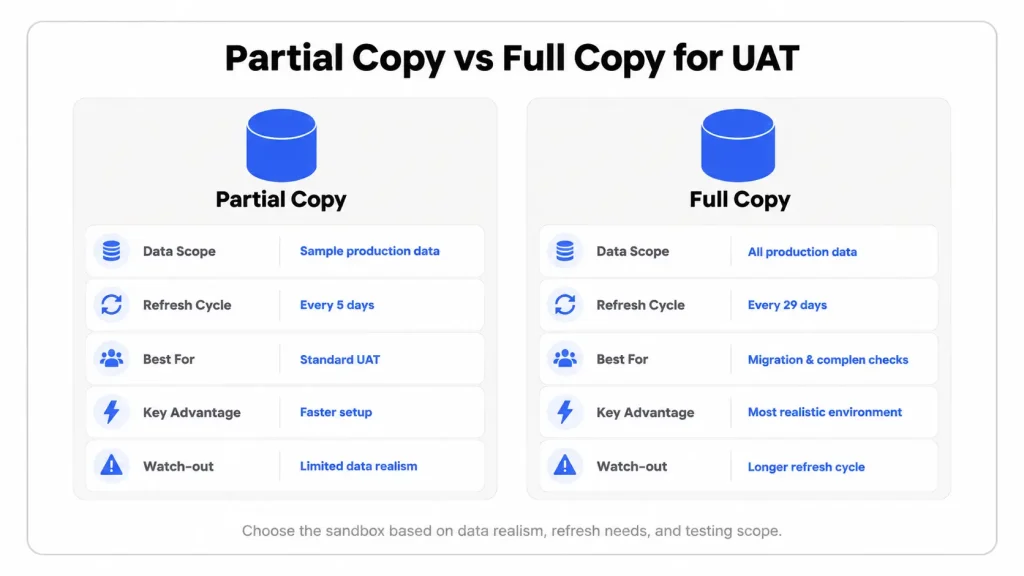
Partial Copy fits most UAT cycles, and Full Copy fits data-heavy validation. Salesforce documentation sets the limits:
| Attribute | Partial Copy | Full Copy |
|---|---|---|
| Data included | 5 GB sample via template | Complete production data |
| Refresh interval | Every 5 days | Every 29 days |
| Typical UAT use | Standard release validation | Migration and volume validation |
| Cost position | Lower, included in Enterprise edition | Higher, included in Unlimited edition |
The 5-day refresh interval matters during active UAT. A stale Partial Copy falls behind production configuration within one sprint. The 29-day lock on Full Copy makes refresh timing a planning decision, not an afterthought.
Our default is Partial Copy for the UAT cycle itself. Full Copy earns its cost in one situation: migration validation, where record volume is the thing under test. Provision it for that sprint alone, because the 29-day lock starts the moment it exists.
What Data Belongs in a UAT Sandbox?
UAT sandbox data must mirror the records users handle daily. Seed 3 data categories before execution starts:
- Masked customer accounts: Production accounts are copied and anonymized, with structures and relationships kept intact.
- Real pricing variables: Discount matrices, price books, and approval thresholds match production values.
- Live product SKUs: The actual catalog testers quote against, not placeholder products.
Empty text fields produce false sign-offs. A quote flow that passes on a blank account fails on a real one. Real accounts carry 40 line items and a discount matrix.
How to Log In to the Salesforce UAT Sandbox
Sandbox login uses a dedicated URL and a modified username, not the production credentials. Follow 4 checks:
- Open the sandbox login portal: Go to test.salesforce.com, not the production login page.
- Enter the sandbox username: The format appends the sandbox name: username@company.com.sandboxname, such as jane@company.com.uat.
- Enter the password: Refreshed sandboxes issue temporary passwords through the admin.
- Confirm the environment: Check the sandbox indicator in the header before testing anything.
A sandbox refresh resets usernames to this appended format. Hardcoded email references break at that point, so verify integrations after every refresh.
Realistic data and correct access answer where testers work. The role matrix answers who does the work.
Who Runs Salesforce UAT?
Salesforce UAT is run by business users and coordinated by a business analyst. An admin prepares the environment, and one named owner signs off. Each role carries a defined minimum time commitment. Undefined roles produce rushed, low-quality sign-offs.
The 4 Core UAT Roles
Core roles carry the execution and the decision. The matrix below sets the minimum realistic ask per role:
| Role | Responsibility | Minimum realistic ask |
|---|---|---|
| Salesforce admin | Sandbox setup, permission sets, data seeding | 2 to 3 days before execution |
| Business analyst | Scenario writing, defect triage, coordination | Half-time through the UAT window |
| Business users | Scenario execution per assigned profile | 2 to 4 hours per tester |
| Sign-off owner | Final accept or reject decision against criteria | 1 review session plus written approval |
Busy sales representatives are the weakest link in this matrix. A 2-hour focused block with prepared scenarios beats a vague week-long request every time.
The 3 Supporting UAT Roles
Supporting roles keep execution unblocked without running tests themselves:
- Project manager: Timeline ownership, tester scheduling, and escalation when blockers stall the window.
- Developers on standby: Fast fixes for blocker defects during the execution window, without active testing duties.
- Compliance officer: Review of test outcomes for audit readiness, required in regulated industries only.
Why Does UAT Pass for One Profile and Fail for Another?
UAT passes for one profile and fails for another because profiles and permission sets control access per user type. Field access, record visibility, and automation behavior all vary by profile. A quote approval flow runs cleanly for a System Administrator. The same flow errors for a Field Sales profile lacking edit access on one pricing field.
Admin-only UAT hides this entire defect class. Test every scenario under every profile that runs it in production.
Our Salesforce CPQ validation engagement made this pattern impossible to ignore. Quote approval flows ran clean under admin credentials through every functional check. The same flows failed under sales profiles, at pricing-field access and approval-routing boundaries. Profile-boundary failures outnumbered functional defects in that engagement. Every scenario we write now carries a profile column for that reason.
Role coverage feeds the scenario document itself: the UAT template.
What Does a Salesforce UAT Testing Template Include?
A Salesforce UAT testing template includes 9 columns, from test ID through defect reference. The full column set appears in the table below. The template turns scattered feedback into a sign-off record. One row equals one testable scenario.
The 9 Template Columns
Each column captures one piece of the acceptance record:
| Column | What it captures |
|---|---|
| Test ID | A unique reference, such as UAT-014 |
| Business process | The journey under test, such as Lead-to-Cash |
| Scenario | The task in business language |
| Test data | The named account, product, or record set used |
| Profile | The Salesforce profile executing the test |
| Expected result | The measurable pass condition |
| Actual result | What happened during execution |
| Status | Pass, fail, or blocked |
| Defect reference | The linked defect ID for failures |
Filled Example: 3 Core Test Journeys
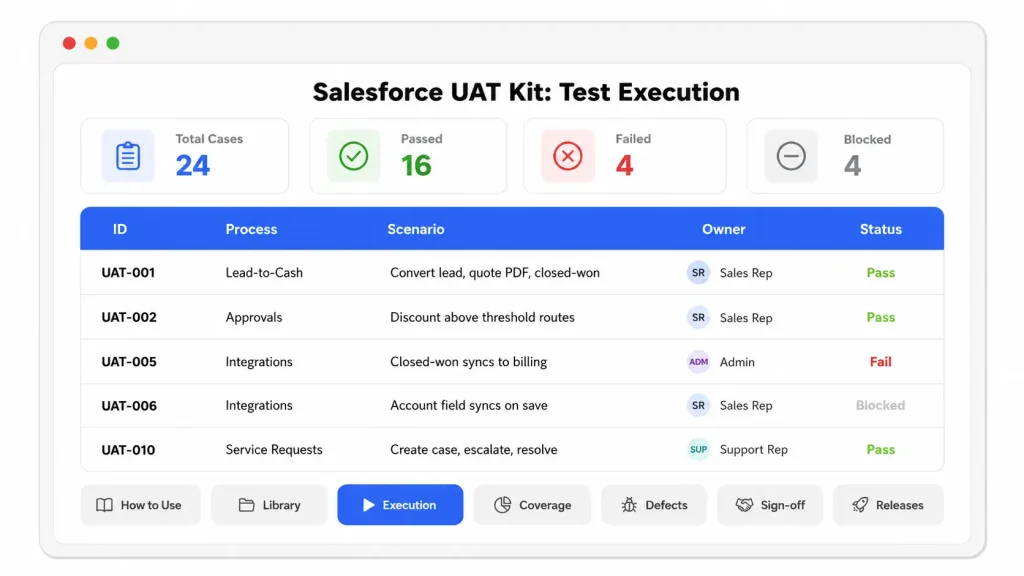
The filled template ships with 3 journeys that anchor most Salesforce UAT cycles. Sample rows show the expected level of detail:
| Test ID | Business process | Scenario | Profile | Expected result | Status |
|---|---|---|---|---|---|
| UAT-001 | Lead-to-Cash | Log a lead, convert to opportunity, generate quote PDF, mark closed-won | Sales Rep | Quote PDF generates with correct pricing, stage updates to Closed Won | Pass |
| UAT-002 | Automation triggers | Change opportunity status and confirm alert delivery | Sales Manager | Email alert and internal notification fire without manual steps | Pass |
| UAT-003 | Integration sync | Create a record and verify arrival in the billing system | Admin | Record reaches billing with correct field mapping | Fail |
How to Use the Template
The template works in 4 moves, from copy to sign-off:
- Copy the blank sheet and replace the example rows with your in-scope processes.
- Fill test data and profile per row before execution starts, never during.
- Record status and defect references live as testers work through their blocks.
- Export the completed sheet as the evidence attachment for the sign-off document.
Download the Salesforce UAT Template Kit
The kit downloads as a single .xlsx with 7 sheets, from scenario library through release regression. Download the Salesforce UAT kit (.xlsx). The file is free, self-hosted, and gated by nothing. The 7 sheets cover the full cycle:
- How to Use: A six-line operating guide keeps the file usable without this article open.
- Scenario Library: 24 pre-written Salesforce scenarios across 7 process areas, each with suggested profiles.
- Test Execution: The tracking sheet enforces one row per scenario per profile.
- Profile Coverage Matrix: Planned and passed counts calculate automatically per process area and profile. A zero reveals an untested profile.
- Defect Log: Record ID, profile, and screenshot reference are built in as required columns.
- Sign-Off Record: Execution evidence pulls in automatically against editable criteria, with decision and signature lines.
- Release Regression: Spring, Summer, and Winter rows track the preview-window reruns.
The structure is the one we run in facilitation engagements. Every column earned its place by surviving triage: each field exists because its absence once stalled a defect queue.
A kit covers the full cycle. The types below decide how it gets applied.
What Are the Types of Salesforce UAT?
Salesforce UAT takes 6 forms: alpha, beta, black box, contract acceptance, regulation acceptance, and operational acceptance testing. Most implementations combine black box execution with operational checks. The form follows the release risk, not the other way around.
Alpha Testing
Alpha testing is internal validation by business analysts and product owners before wider user groups join. Early usability and configuration issues surface here. Basic workflows get confirmed before real end-users spend their limited testing hours.
Beta Testing
Beta testing puts a selected group of real end-users into a near-production environment before full rollout. Feedback covers usability, navigation, and business alignment that internal testers overlook. Staged rollouts across regions or teams benefit most from this form.
Black Box Testing
Black box testing validates outcomes without any knowledge of the configuration behind them. Users interact with the interface exactly as they will in production. This form fits standard release validation, because it mirrors real usage most closely.
Contract Acceptance Testing
Contract acceptance testing verifies the implementation against the specifications in contracts or statements of work. Vendor-led implementations rely on this form. Every contracted deliverable gets confirmed as complete before final payment or handover.
Regulation Acceptance Testing
Regulation acceptance testing validates compliance with industry rules and internal governance standards. Coverage includes data security, role-based access control, and audit logging. Regulated industries treat this form as mandatory, not optional.
Operational Acceptance Testing
Operational acceptance testing checks production readiness beyond features: backups, recovery procedures, and security controls. The system proves it survives operations, not just demos. This form closes the gap between “works in testing” and “runs in production.”
Whichever form applies, the platform underneath keeps moving on its own schedule.
How Does UAT Change Across Salesforce Release Cycles?
UAT changes from a one-time project phase into a recurring cycle, because Salesforce ships 3 major releases every year. Every release lands in production automatically. Custom workflows that passed in January face changed platform behavior by June.
The 3 Annual Salesforce Releases
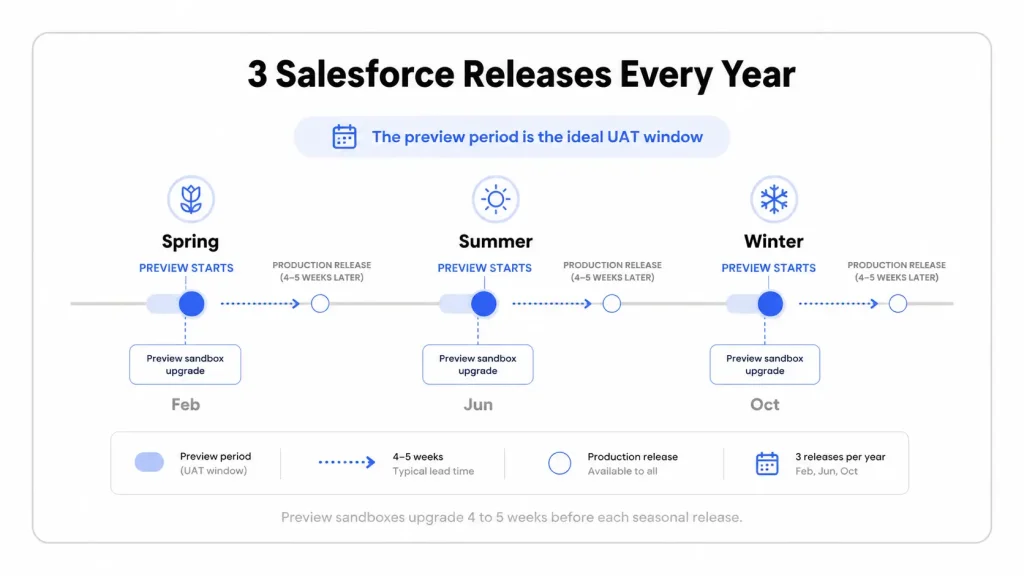
Salesforce delivers 3 seasonal releases on a fixed rhythm:
- Spring: Rollout lands in February.
- Summer: Rollout lands in June.
- Winter: Rollout lands in October.
Each release carries hundreds of feature changes, platform enhancements, and security updates. Upgrades are automatic, with no opt-out for the platform version.
The Sandbox Preview Window
The sandbox preview window is the UAT slot Salesforce builds into every release. Preview sandboxes upgrade 4 to 5 weeks before production. That window exists for one purpose: rerun your core journeys against the new version before it reaches users. Teams that skip the preview discover breakage in production, on Salesforce’s schedule rather than their own.
Building a Release UAT Cadence
A release cadence turns the template into a standing regression asset. For clients on managed cycles, we book the preview windows at engagement start. The Salesforce calendar sets those dates before any release lands. The cycle repeats 3 times a year:
- Refresh a preview sandbox before the preview cutoff date.
- Rerun the core journey rows from the maintained template.
- Log breakage against the release notes to trace the changed behavior.
- Fix, retest, and re-confirm sign-off before the production release weekend.
A recurring cadence multiplies the ways UAT goes wrong, which the next section catalogs.
What Are the Common Salesforce UAT Challenges?
The 5 common Salesforce UAT challenges are rushed testers, stale sandbox data, missing sign-off ownership, permission gaps, and release-window collisions. Each challenge has a structural fix, not a motivational one.
Rushed Testers
Rushed testing happens when sales representatives squeeze scenarios between calls and approve without reading. The sign-off looks complete and covers nothing.
Fix: Prepared scenarios plus a fixed 2-hour calendar block per tester. Structure removes the incentive to rush.
Stale Sandbox Data
Stale data appears when configuration drifts from production between refreshes. Testers validate against an org that no longer exists.
Fix: A refresh scheduled at UAT kickoff, inside the sandbox type’s refresh interval. The 5-day Partial Copy interval makes this practical.
Missing Sign-Off Ownership
Missing ownership means nobody holds the accept-or-reject decision, so launches proceed by default. Disputes surface after go-live, when they cost most.
Fix: One named owner with written criteria, set in step 1. Default launches end when a signature is required.
Permission Gaps
Permission gaps stay hidden when admin-profile testing covers scenarios that standard profiles hit daily. The defect class from the role section lands here in production.
Fix: Profile-mapped tester assignment, one scenario per profile that runs it. The template’s profile column enforces the mapping.
Release-Window Collisions
Collisions occur when internal UAT lands in the same week a seasonal release changes the sandbox. Results become untraceable: the defect belongs to your change or to Salesforce’s, and nobody knows which.
Fix: The Salesforce release calendar goes into the UAT plan on day one. Internal UAT windows avoid preview upgrade dates.
Fixes for individual challenges roll up into a repeatable set of practices.
Which Best Practices Make Salesforce UAT Reliable?
Reliable Salesforce UAT rests on 6 practices, from written criteria through written sign-off. Each practice below removes one recurring failure mode.
Write Acceptance Criteria Before Scenarios
Criteria defined upfront prevent moving goalposts at sign-off time. Pass conditions written after execution bend toward whatever happened. Pass conditions written before execution measure what was promised.
Test Journeys, Not Clicks
Journey-based scenarios expose the gaps that isolated feature checks miss. A lead conversion test in isolation passes. The full lead-to-quote journey reveals the broken handoff between them.
Cover Every Production Profile
Profile coverage means one scenario run per profile that touches the process. The template’s profile column makes coverage visible and auditable. Uncovered profiles are the largest source of week-one production defects.
Seed Masked, Realistic Data
Realistic data keeps pass results meaningful. Real pricing structures and account complexity surface the defects placeholder data hides. Masking protects personal data while keeping business structures intact.
Log Defects With Record IDs and Screenshots
Complete defect records cut triage from days to hours. A defect log entry needs 3 items: the screenshot, the record ID, and the profile used. Partial logs send admins hunting instead of fixing.
Collect Sign-Off in Writing
Written sign-off against named criteria survives leadership changes and release cycles. Meetings end with agreement. Documents end with accountability. Across our testing work, this single practice separates smooth go-lives from disputed ones.
Which Tools Support Salesforce UAT?
Salesforce UAT runs on the native sandbox plus 4 supporting tool categories. The categories cover automation, codeless authoring, and release management. Tool selection follows team size and release frequency.
Salesforce Sandbox
The native sandbox environment carries every UAT cycle. Partial Copy serves as the standard UAT choice, and Full Copy serves migration validation.
- Provides isolated testing against production configuration.
- Supports data templates for controlled seeding.
- Enforces refresh intervals of 5 days (Partial) and 29 days (Full).
Provar
Provar is a Salesforce-native automation tool for converting repeated UAT journeys into maintained checks.
- Automates regression journeys across releases.
- Handles Salesforce metadata changes with lower script breakage.
- Suits teams running validation every sprint.
ACCELQ
ACCELQ delivers codeless automation for teams where business analysts maintain the test assets.
- Builds automated scenarios without programming skills.
- Keeps test logic readable for business stakeholders.
- Fits mixed technical and business testing teams.
Copado Robotic Testing
Copado Robotic Testing targets release-cadence automation for orgs validating every seasonal release.
- Schedules regression runs against preview sandboxes.
- Connects results to release management pipelines.
- Suits orgs with formal release governance.
Salesforce DevOps Center
DevOps Center provides native release management connecting stories, deployments, and validation status.
- Tracks user stories through to deployment.
- Records validation status per change.
- Ships free with the platform for standard workflows.
Frequently Asked Questions About Salesforce UAT
How Long Does Salesforce UAT Take?
Salesforce UAT takes 1 to 3 weeks for a standard implementation release. The range moves with 3 variables: scenario count, tester availability, and defect volume from earlier levels. Release-cycle regression compresses to 3 to 5 days with a maintained template.
What Is the Difference Between SIT and UAT in Salesforce?
System Integration Testing (SIT) validates data exchange with connected systems, and UAT validates business fitness. SIT is run by QA engineers against technical specifications. UAT is run by business users against business requirements. SIT precedes UAT in every release sequence.
Can Salesforce UAT Be Automated?
Yes, Salesforce UAT can be partially automated, with limits. Repeated regression journeys convert well to tools like Provar or Copado. The acceptance decision itself stays human. Automation confirms behavior, and business users confirm fitness for daily work.
What Are the Sign-Off Criteria for Salesforce UAT?
Sign-off criteria are the written pass conditions defined in step 1 of the process. A complete set names 4 items: in-scope processes, the pass threshold per scenario, acceptable open-defect severity, and the sign-off owner. Sign-off happens against this document, not against general satisfaction.
What Happens After UAT Sign-Off?
After UAT sign-off, the release moves through deployment, hypercare, and regression baselining. Deployment follows the approved change set into production. Hypercare covers 1 to 2 weeks of live monitoring with fast defect response. Passed scenarios then become the regression baseline for the next cycle.
How Many Users Should Participate in Salesforce UAT?
Salesforce UAT needs 1 to 2 testers per production profile in scope. A typical implementation lands at 4 to 8 testers. Profile coverage drives the count, not headcount targets. A 200-user org with 4 profiles needs 8 briefed testers, not 40 casual ones.
How Do You Get Support for Salesforce UAT?
Salesforce UAT support means handing preparation and execution management to a dedicated QA team. Business users keep the testing blocks and the sign-off decision. The facilitation model solves the time problem without removing user validation.
What a UAT Facilitator Handles
A facilitator takes 4 tasks off the internal team’s plate:
- Scenario authoring: Journey-based test scenarios written from your process documentation.
- Persona and sandbox setup: Profiles, permission sets, and masked data configured before testers arrive.
- Execution management: Scheduling, progress tracking, and defect logging run to completion.
- Sign-off preparation: Results compiled against the acceptance criteria for a clean decision.
What Stays With Your Team
Internal teams keep the parts that require business judgment. Business users keep their 2-hour testing blocks, because their fitness verdict is the point of UAT. The sign-off owner keeps the final decision. Everything around those two duties becomes managed work. Teams evaluating this model for CRM rollouts can review our CRM application testing services for scope and engagement options.

 11 Jan 2024