AI in Software Testing: What It Is, How to Use It, and Its Limits

Rimpal Mistry Testscenario
 02/06/2026
This guide explains what AI in software testing is, how it differs from traditional automation, how its 5 core capabilities work, how to adopt it in 6 steps, which tools lead the market, where it still fails, and what comes next.
What Is AI in Software Testing?
AI in software testing is the use of machine learning, natural language processing, and large language models (LLMs) to generate, execute, maintain, and prioritize software tests. AI handles the repetitive layers of test work. Humans direct strategy, review outputs, and own quality judgment.
AI operates in 2 modes inside QA workflows. AI-assisted testing works as a co-pilot: the tester prompts, the AI drafts, the tester approves each output before it counts. Autonomous agent testing goes further: agents plan, execute, and adapt tests on their own, with humans supervising the loop instead of driving each step.
One boundary keeps this topic precise. Using AI to test software is a separate discipline from testing AI systems themselves, which covers bias, model behavior, and output validation. That second discipline has its own framework in How To Test AI Models.
How Is AI Testing Different from Traditional Test Automation?
AI testing differs from traditional automation in one structural way: scripted automation executes fixed instructions, while AI learns from the application and adapts. A scripted Selenium test breaks when a button label changes. An AI-driven test maps the change and continues running.
| Dimension | Traditional automation | AI-driven testing |
|---|---|---|
| Test creation | Engineers hand-code each script | Generated from plain-language requirements |
| Maintenance | Manual locator fixes every sprint | Self-healing adapts at runtime |
| Application changes | Scripts break on UI updates | Models re-map elements automatically |
| Failure analysis | Raw stack traces | Root-cause suggestions from historical data |
| Scaling cost | Grows linearly with suite size | Flattens as the model learns the app |
Traditional automation still anchors the stack. AI sits on top of it, deciding what to test, repairing what breaks, and ranking what runs first.
How Does AI Work in Software Testing?
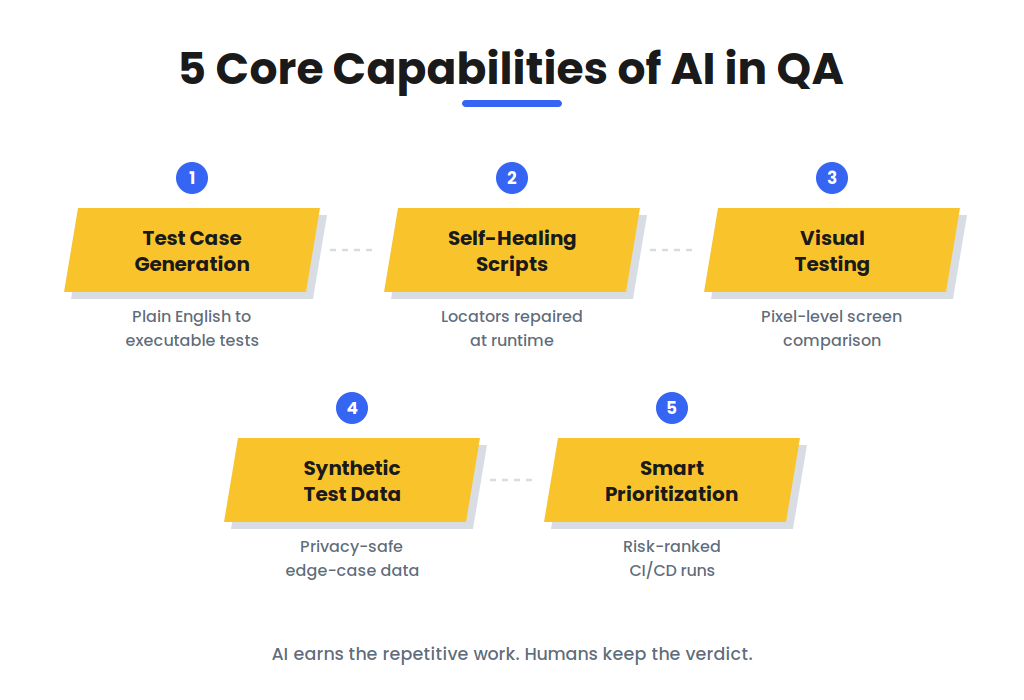
AI works in software testing through 5 core capabilities: test case generation, self-healing scripts, visual testing, synthetic test data, and smart prioritization.
1. Intelligent Test Case Generation
Plain-English requirements become structured test cases, BDD scenarios, or framework-ready code for Playwright, Selenium, and Cypress. The model reads a user story, extracts the acceptance criteria, and drafts positive, negative, and edge-case variants in one pass.
Example: “Users can reset passwords via email” produces the happy path, the expired-token path, and the invalid-email path together. A QA engineer reviews the logic before any generated case joins the regression suite.
2. Self-Healing Test Scripts
When a UI change breaks a locator, the AI maps the element’s new identity and repairs the script at runtime. Flaky failures caused by renamed buttons, shifted layouts, and refactored CSS drop sharply.
The control matters as much as the capability. Every healed locator needs an audit trail, because a silent wrong-element fix is worse than a visible failure.
3. Visual Testing
Computer vision compares rendered screens pixel by pixel across browsers, devices, and resolutions. Overlapping text, broken layouts, missing components, and rendering drift get flagged without manual screenshot review.
Visual AI catches the defect class that functional assertions miss: the test passes while the page renders wrong.
4. Synthetic Test Data Generation
AI builds realistic, privacy-safe datasets for edge cases, negative paths, and volume tests. Regulated teams in finance and healthcare test against production-shaped data without touching production records.
One known weakness applies. Synthetic data drifts toward average cases unless explicitly steered, so effective teams combine synthetic data for scale with sampled real data for lived complexity.
5. Smart Prioritization and Debugging
Historical defect data ranks which tests run first in the CI/CD pipeline. Code changes map to the test areas they touch, so a 4-hour suite delivers its riskiest signals in the first 20 minutes.
On failure, the AI points to probable root causes. The tester receives the suspect commit, component, and pattern instead of a raw stack trace.
Where Does AI Apply Across Testing Levels?
AI applies at 4 testing levels: unit, functional, non-functional, and visual. At unit level, it generates cases from code structure and predicts bug-prone modules. At functional level, it automates data-driven tests and prioritizes flows by real user behavior.
At non-functional level, it forecasts performance bottlenecks from historical load data, and at visual level it replaces manual regression screenshots entirely.
What Are the Benefits of AI in Software Testing?
AI in software testing delivers 6 benefits: faster test creation, lower maintenance, wider coverage, earlier defect detection, stable regression cycles, and data-driven prioritization.
- Faster test creation. Natural-language input replaces hand-coded scripts for routine cases, compressing days of authoring into hours.
- Lower maintenance. Self-healing absorbs the UI churn that consumes QA hours every sprint.
- Wider coverage. Generated cases reach edge conditions and input combinations that manual planning misses.
- Earlier defect detection. Pattern analysis flags bug-prone code areas before full test runs complete.
- Stable regression cycles. Suites run continuously in CI/CD without breaking on every release.
- Data-driven prioritization. Test order follows risk instead of folder order, so critical failures surface first.
The benefits compound where suites are large and releases are frequent. A 50-case suite gains little; a 5,000-case suite gains a workweek per cycle.
How to Use AI in Software Testing?
Teams introduce AI in software testing through a 6-step adoption process, starting with one repetitive workflow.
- Pick one high-repetition workflow. Regression or smoke testing gives AI the clearest baseline to beat. Complex exploratory work stays out of the pilot.
- Define the human review gate. No AI-generated test enters the suite before a QA engineer validates its logic. The gate is a standing rule, not a phase.
- Pilot one tool against your existing framework. Run it in parallel with current automation for 2-3 sprints. Change nothing else, so the comparison stays clean.
- Measure against baseline. Track test creation time, flake rate, and defect escape rate. Numbers decide expansion, not demos.
- Expand into data and visual checks. Synthetic data generation and visual validation come after the core pilot proves out. Each expansion repeats the same measurement discipline.
- Keep judgment work with humans. Exploratory testing, usability evaluation, and release-risk decisions stay manual by design. AI earns the repetitive work, never the verdict.
The phased path matters because trust, not technology, decides adoption. Teams that skip the review gate inherit AI’s errors at suite scale.
Which Tools Are Used for AI in Software Testing?
AI testing tools fall into 5 categories: agentic platforms, visual validation, all-in-one automation, plain-language testing, and LLM-driven test agents.
| Tool | Category | Primary strength |
|---|---|---|
| Mabl | Agentic workflows | Low-code autonomous agents across web and API layers |
| Applitools | Visual validation | Visual AI for layouts, dynamic UI states, and cross-device consistency |
| Katalon | All-in-one automation | Test generation with self-healing in a single platform |
| testRigor | Plain-language testing | End-to-end tests written and executed in plain English |
| ACCELQ | Codeless enterprise automation | Generative AI for cloud apps such as Salesforce and SAP |
| LambdaTest KaneAI | LLM test agent | Natural-language test generation, execution, and analysis |
Tool choice follows your architecture and platform focus, not feature counts. The pilot step above answers which category fits before any contract does.
What Are the Limitations of AI in Software Testing?
AI in software testing has 6 limitations: hallucinated test logic, false-positive self-healing, data and privacy risk, scalability degradation, synthetic-data blind spots, and vendor lock-in.
- Hallucinated test logic. Generative models produce plausible-but-wrong assertions, which creates false confidence: the test passes while the bug ships. Human review before suite promotion is the control.
- False-positive self-healing. A healing algorithm can bind a locator to the wrong element without raising an error, turning a real defect into a green checkmark.
- Data and privacy risk. A Testsigma practitioner survey found 43% of QA professionals rank data and privacy risks as their top AI-testing challenge, ahead of inconsistent performance (26%) and inaccurate results (17%). AI needs realistic data; realistic data carries GDPR, HIPAA, and SOC 2 exposure.
- Scalability degradation. Tools trained on small codebases lose accuracy as the application grows in size and complexity. The decline is quiet, which makes periodic re-validation against known defects necessary.
- Synthetic-data blind spots. Generated datasets under-represent rare, failure-triggering inputs unless explicitly guided, weakening robustness testing exactly where it matters most.
- Vendor lock-in. Proprietary platforms hold test logic in closed formats, making migration to open alternatives slow and expensive.
Maturity varies by capability. Test generation and self-healing are production-ready today. Defect prediction and fully autonomous agents remain emerging: useful in narrow contexts, unreliable as a sole safety net.
What Is the 30% Rule for AI in Testing?
The 30% rule keeps roughly 30% of testing work with humans: strategic review, context evaluation, safety auditing, and complex edge-case mapping, while AI handles up to 70% of repetitive work. Engineering teams adopt it as a guardrail against over-delegation.
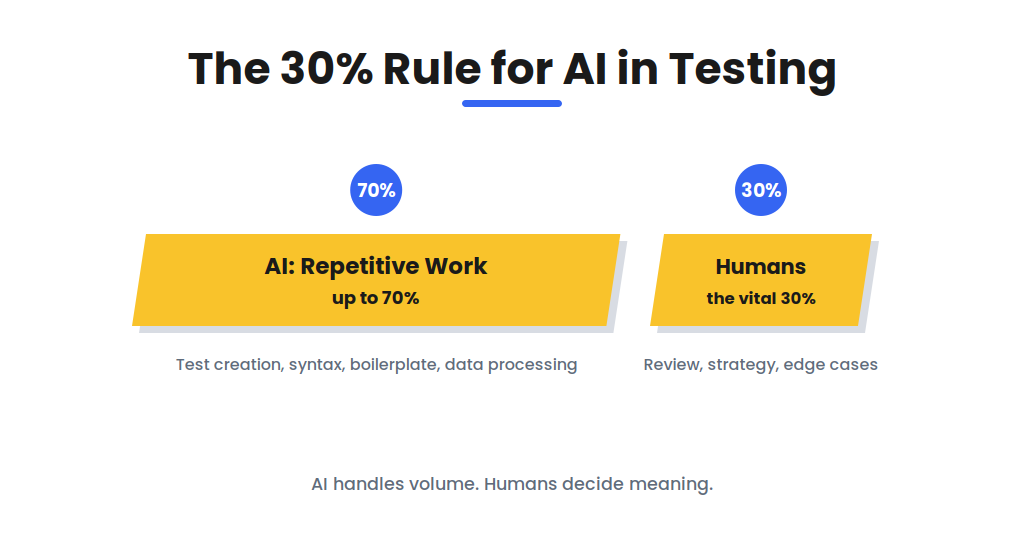
The split follows capability, not preference. AI excels at volume: case creation, syntax, boilerplate, and data processing. Humans excel at meaning: whether a test validates the right business logic, whether a release risk is acceptable, and whether an edge case matters.
Teams applying the rule report a practical side effect. Testers stop competing with AI on speed and start auditing it on accuracy, which is where escaped defects actually hide.
Will AI Replace Software Testers?
No, AI will not replace software testers; it replaces the repetitive portion of their workload while raising the value of judgment, exploration, and risk assessment.
The division is visible in any AI-adopting QA team. What shifts to AI: test authoring for routine flows, script maintenance, data generation, and result triage. What stays human: exploratory testing, usability evaluation, acceptance decisions, compliance sign-off, and the review gate that catches AI’s own errors.
The role changes shape rather than disappearing. The tester of 2026 supervises AI output the way a senior engineer reviews a junior’s code: faster throughput, same accountability.
What Is the Future of AI in Software Testing?
The future of AI in software testing moves in 3 directions: agentic autonomy, predictive quality, and user-behavior-driven test design.
Agentic platforms are shifting from single-task assistance toward multi-agent systems that plan, execute, and maintain suites end to end, with humans in supervisory roles. Predictive quality turns testing from detection into anticipation: models flag risk before code merges instead of after suites fail. User-behavior driven design pulls from production analytics and session recordings, so tests mirror how people actually use the product rather than how teams assume they do.
Gartner’s 80%-by-2027 adoption projection frames the timeline. The teams building review gates and measurement baselines now will absorb that shift without quality debt.
How Does Testscenario Apply AI in QA Engagements?
Testscenario applies AI where it accelerates and humans where they decide, running the 30% rule as practice rather than theory. AI handles test generation, regression execution, and suite maintenance inside our engagements. Our engineers own the review gates, exploratory coverage, and release judgment.
Client suites run through AI Testing engagements with measurable baselines: creation time, flake rate, and escape rate, reported per sprint. Teams scaling scripted coverage pair it with our Automation Testing services.
FAQs
How does AI affect software testing?
AI affects software testing by automating test creation, maintenance, and prioritization, which shortens release cycles and shifts human effort toward review and exploratory work.
Which AI tool is used for testing?
Mabl, Applitools, and Katalon are among the most widely adopted AI testing tools, covering agentic automation, visual validation, and all-in-one test management respectively.
How do QA teams use AI day to day?
QA teams use AI daily to draft test cases from requirements, repair broken locators after UI changes, and rank regression runs by defect risk.

 09 Jul 2024


