Real Device Testing: What It Is, Process, and Best Practices

Rimpal MistryCo-Founder & VP Operations
 09/06/2026
Real device testing validates applications on physical smartphones, tablets, and wearable devices.
An app that passes every check in a simulator still fails in users’ hands. Failures appear when the battery runs low, the network drops to 3G, or a call interrupts checkout.
Physical hardware reproduces these conditions. Virtual tools approximate them.
This guide defines real device testing, walks through its 5-step process, and covers the 7 best practices QA teams apply before release.
What is Real Device Testing?
Real device testing is the process of validating an application on physical smartphones, tablets, and wearable devices. QA teams execute test cases on actual hardware instead of emulators or simulators. The method captures hardware behaviors that virtual environments cannot replicate.
Validation on physical hardware covers 4 layers of application behavior: functional correctness, hardware interaction, performance under device constraints, and user experience on real screens.
A tester holding the device experiences the app the way a customer does. Thermal warmth under load, touch latency, and exact font rendering at a given pixel density all come through. None of these sensations exists inside a virtual machine.
The ISTQB Foundation Level Syllabus (v4.0) states that test environments must be “sufficiently similar to the deployment environment to allow for meaningful testing.” Real devices meet this requirement at the highest fidelity available. Emulators come close through binary translation of hardware instructions. Simulators cover software-level checks only.
What Is a Real Device in Software Testing?
A real device in software testing is a physical, production-grade unit of the hardware an application targets. Production-grade means consumer smartphones (iPhone 16, Samsung Galaxy S25, Google Pixel 9), tablets, smartwatches, and smart TVs running production operating systems, drivers, and radio firmware.
No virtualization layer sits between the application and the silicon. The defects that surface, surface for real.
What Is Device Testing in Software Testing?
Device testing in software testing is the validation of an application across the hardware units its users own. The discipline spans 3 execution environments: simulators, emulators, and real devices. Real device testing is the subset performed exclusively on physical hardware.
Results from this subset carry the highest evidential weight of the three. The Android ecosystem alone spans 24,000 or more distinct device models. Fragmentation at that scale turns device coverage planning into a core QA activity rather than an afterthought.
Why Is Real Device Testing Important for Mobile Apps?
Real device testing is important for mobile apps because it detects the 3 defect categories virtual environments cannot reproduce. The 3 categories are hardware-dependent failures, real-network failures, and true performance degradation. Each one surfaces only on physical hardware. Each one reaches production undetected when QA relies on virtual tools alone.
Hardware-dependent failures include sensor inaccuracy, biometric authentication errors, camera malfunctions, and Bluetooth pairing faults. A fingerprint flow that works flawlessly in development breaks on a device whose sensor firmware handles partial reads differently.
Real-network failures include carrier handoffs, dropped connections, SMS interrupts, and incoming calls landing mid-transaction.
True performance degradation includes battery drain under sustained use, thermal throttling during extended gameplay, and memory pressure from background production apps.
There is a business layer beneath the technical one. Crashes and battery complaints drive 1-star reviews. One-star reviews suppress store ranking, store ranking drives download velocity, and download velocity is revenue.
Real device coverage protects all 3 outcomes: app store ratings, user retention, and release confidence.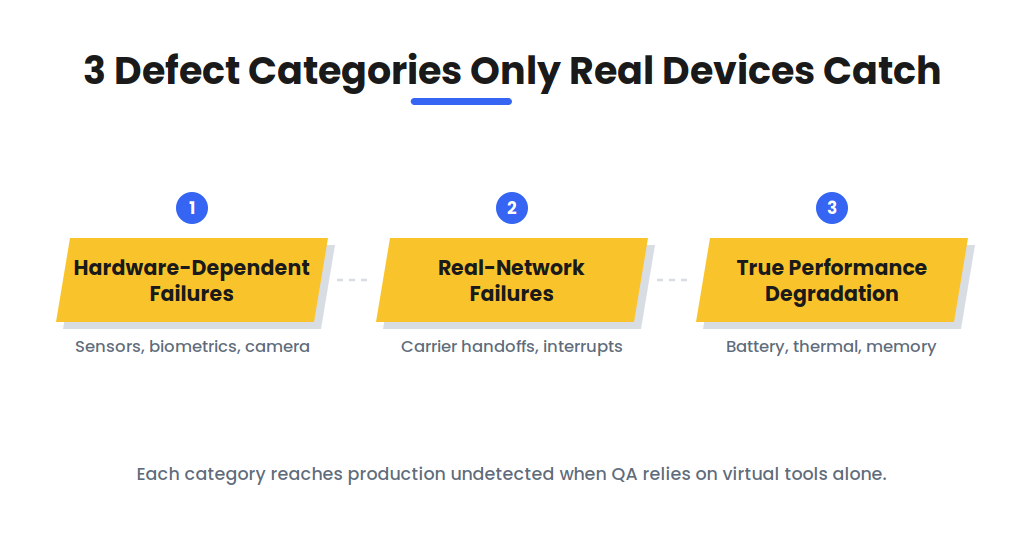
How Does Real Device Testing Improve App Performance?
Real device testing improves app performance by exposing the application to genuine hardware constraints. The target CPU’s clock limits, the GPU’s rendering pipeline, available RAM, and thermal throttling all shape real behavior.
Performance measured on a developer workstation reflects the workstation. Performance measured on a 3-year-old mid-range Android phone reflects what a large share of real users experience daily.
QA teams profile launch time, frame rate, memory consumption, and energy use across hardware tiers. Optimization then targets the weakest tier.
How Does Real Device Testing Improve Accuracy for Location-Based Services and GPS Functionalities?
Real device testing improves accuracy for location-based services and GPS functionalities by using the device’s physical GPS receiver. A physical receiver produces genuine satellite-fix latency, signal degradation between tall buildings, and accuracy drift during movement.
Simulators inject fabricated coordinates with zero acquisition delay. Fabricated coordinates hide every one of these failure modes.
Geofencing, turn-by-turn navigation, and location-based pricing all depend on receiver accuracy. These features require validation in indoor, outdoor, and in-transit conditions on real hardware.
How Do You Perform Real Device Testing Step by Step?
Real device testing follows a 5-step process from objective definition through analysis and iteration. Each step produces the input for the next. Skipped steps create gaps in device coverage or results nobody can trace.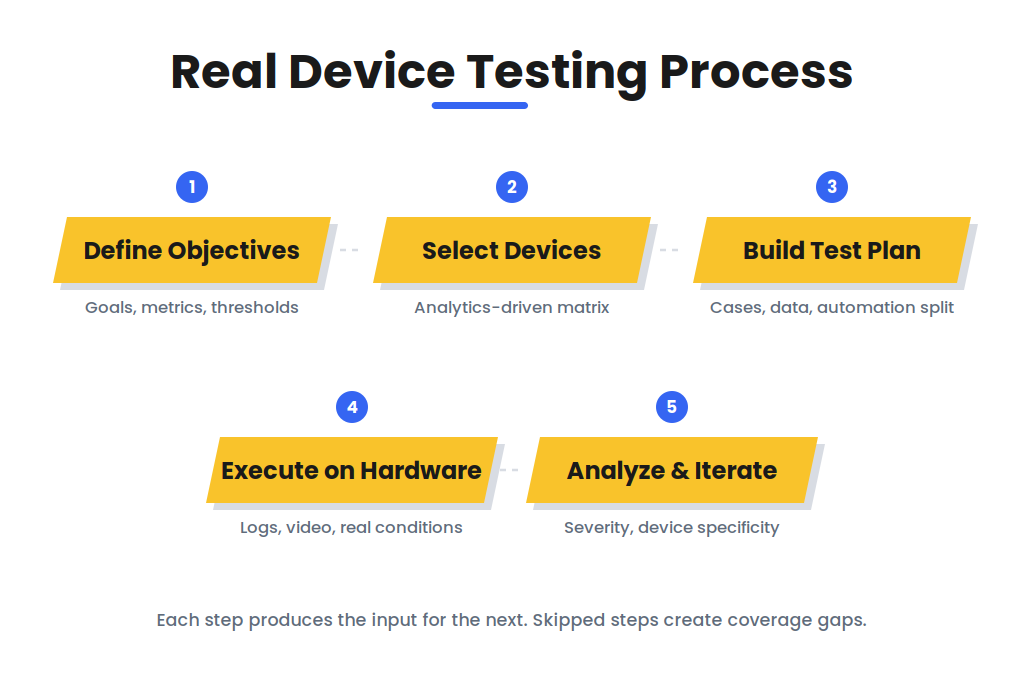
- Define the test objectives. Identify the quality goals the device tests must verify: functional correctness, performance thresholds, hardware-feature behavior, and compatibility targets. Attach a measurable metric to each goal, such as launch time under 2 seconds or a crash-free session rate above 99.5%.
- Select the target devices. Build the device matrix from analytics, not assumptions. Mine your installed-base data for the models, OS versions, and screen sizes users own. Cover 3 hardware tiers (flagship, mid-range, low-end) and include the 2 oldest OS versions the application officially supports.
- Build the test plan. Write test cases for each objective with preconditions, inputs, execution steps, and expected results. Assign each case to manual execution or automation. Appium drives automated cases across Android and iOS devices through a single WebDriver API. Exploratory and gesture-heavy cases stay manual.
- Execute the tests on physical hardware. Run the suite on in-house lab devices or cloud-hosted real devices. Capture logs, screenshots, video recordings, and performance traces in every session. Recreate real conditions deliberately: drain the battery below 15%, throttle the network, trigger an incoming call during checkout, load the background with production apps.
- Analyze the results and iterate. Classify every defect by severity and by device specificity. Device-specific defects get reproduction details naming the exact model, OS version, and conditions. Findings feed the next development cycle, and the device matrix gets refreshed as user analytics shift.
How Do You Build a Device Matrix for Real Device Testing?
A device matrix for real device testing is the prioritized list of devices and OS versions per release. Construction starts with analytics platforms such as Firebase, Mixpanel, or Amplitude. These platforms report the exact models and OS versions in the installed base.
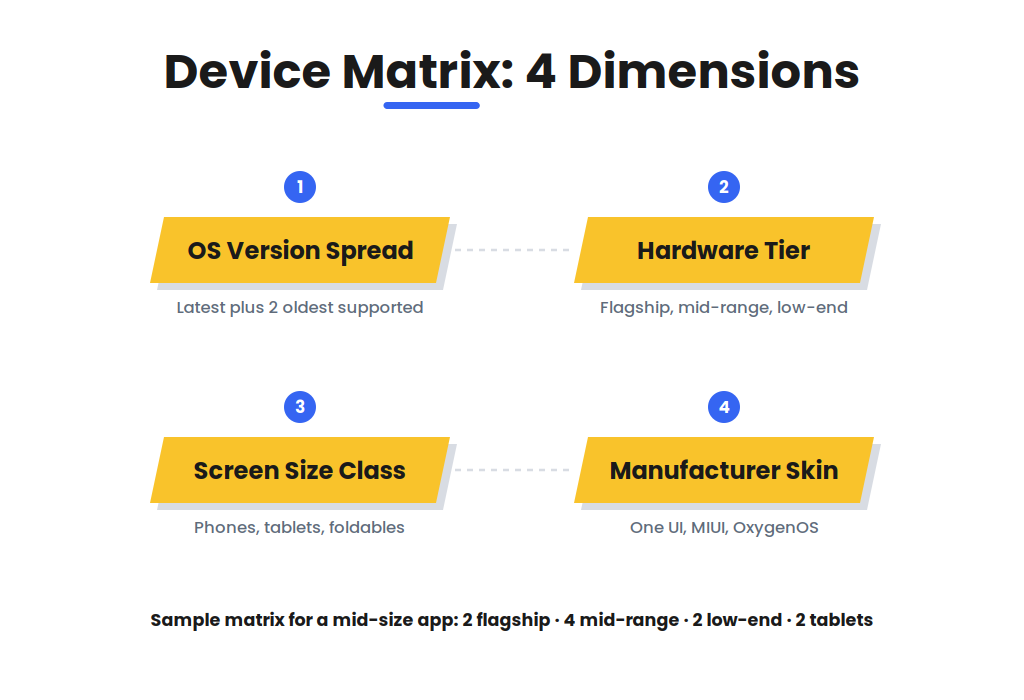
From that data, the matrix balances 4 dimensions: OS version spread, hardware tier, screen size class, and manufacturer skin.
Manufacturer skins matter. One UI (Samsung), MIUI (Xiaomi), and OxygenOS (OnePlus) each modify Android’s memory management, notification handling, and background process rules. An app validated only on stock Android misses skin-specific defects entirely.
Sample matrix for a mid-size app (8 to 12 devices):
- 2 flagship devices on the latest OS
- 4 mid-range devices across 2 or more manufacturer skins
- 2 low-end devices on the oldest supported OS
- 2 tablets where the app supports them
What Are the Best Practices for Real Device Testing?
The best practices for real device testing are 7 operating rules QA teams apply across projects:
- Prioritize devices by user analytics. The matrix mirrors the installed base, not market headlines.
- Cover 3 hardware tiers. Flagship, mid-range, and low-end devices fail in different ways.
- Test on real networks. Wi-Fi, 4G, 5G, and degraded-signal conditions each expose different defects.
- Include interrupt scenarios. Calls, notifications, and network switches must preserve application state.
- Automate repeatable cases. Appium handles regression volume; manual effort goes to exploratory testing.
- Rotate devices as the market shifts. Refresh the matrix from analytics every release cycle.
- Log device-specific reproduction details. Every defect names the exact model, OS version, and conditions.
Risk-based allocation sharpens the first rule further. Core user journeys, such as login, payment, and camera capture, run on the full device matrix.
Secondary flows run on a reduced set. This concentrates device hours where a defect costs the most.
Interrupt scenarios deserve their own discipline. Interrupt Testing validates application state across calls, notifications, and network switches. It belongs in every real-device pass.
What Are Common Issues in Real Device Testing?
Common issues in real device testing fall into 4 categories:
- Device availability. The required model or OS version is missing from the lab on test day.
- Environment instability. OS auto-updates, battery degradation, and leftover state corrupt results between sessions.
- Result fragmentation. The same defect manifests differently across models, multiplying triage time.
- Cost escalation. The market outdates a purchased device inventory within 18 to 24 months.
State hygiene checklist (run before every session):
- Reset the app to default state
- Clear caches and temporary storage
- Isolate user profiles so one session never leaks into the next
Cloud platforms handle availability and cost. Discipline handles the rest.
How Does Real Device Testing Differ from Emulator and Simulator Testing?
Real device testing differs from emulator and simulator testing in hardware execution. Real devices run the application on native hardware with zero abstraction. Emulators translate hardware instructions through software. Simulators model only the software environment, and the abstraction level determines which defect categories each tool detects.
|
Aspect |
Real Device |
Emulator |
Simulator |
|
Hardware fidelity |
Complete: native execution |
High: binary translation |
Low: software model only |
|
Unique defect coverage |
Battery, thermal, carrier, biometric |
Sensor logic, OS-level, GPU pipeline |
UI layout, application logic |
|
Cost |
High: device lab or cloud rental |
Free to moderate |
Free (Xcode) to low |
|
QA phase |
Pre-release, acceptance |
Integration, debugging |
Development, CI/CD |
The 3 tools form a tiered strategy rather than competing options. The complete 10-parameter comparison, the tool-by-tool breakdown, and the decision matrix are covered in Emulator vs Simulator in Software Testing.
Is Real Device Testing Necessary for All App Types?
No, real device testing is not necessary for all app types at every stage. Real device testing is mandatory for 5 app categories:
- Hardware-feature apps using GPS, camera, biometrics, or Bluetooth
- Performance-critical apps such as games, video, and AR
- Regulated apps in banking and healthcare, where acceptance requires production-fidelity evidence
- Carrier-dependent apps such as VoIP and messaging
- Low-end-market apps targeting fragmented budget hardware
Pure-content applications with standard UI components validate adequately on simulators during development. A reduced real-device pass before release covers the remainder.
Which Platforms Provide Real Device Testing Online?
The 5 most used platforms for real device testing online are BrowserStack, Sauce Labs, LambdaTest, AWS Device Farm, and Kobiton. Each platform hosts physical devices in data centers and streams the device screen to the tester’s browser. Cloud access removes device procurement and maintenance from the QA budget entirely.
BrowserStack provides access to 30,000 or more real Android and iOS devices, per its published platform figures.
Sauce Labs operates a Real Device Cloud with public and private device pools plus CI/CD integration.
LambdaTest pairs real device access with cross-browser infrastructure.
AWS Device Farm executes automated suites on physical devices inside AWS data centers.
Kobiton specializes in real device testing with scriptless automation and device lab management for enterprises.
Platform selection follows 3 criteria: device catalog coverage against your matrix, automation framework support (Appium, Espresso, XCUITest), and pipeline integration with Jenkins, GitHub Actions, or GitLab CI.
Should Teams Use an In-House Device Lab or a Cloud Platform?
It depends on security requirements, scale, and the device matrix.
An in-house device lab gives full control over devices, networks, and data residency. Regulated industries such as banking and healthcare frequently mandate this control. The lab carries procurement, maintenance, and refresh costs, and its catalog stays small.
A cloud platform delivers instant access to thousands of models with parallel execution and zero maintenance. The tradeoff is a recurring subscription cost.
The hybrid model resolves this for most teams. Critical or sensitive flows run on a small private lab. Broad compatibility coverage runs on cloud devices.
How Does Real Device Testing Fit into a Complete Mobile QA Strategy?
Real device testing fits into a complete mobile QA strategy as the final validation tier. Simulators provide speed during development. Emulators provide hardware approximation during integration. Real devices provide production fidelity before release, catching the defect categories the earlier tiers cannot.
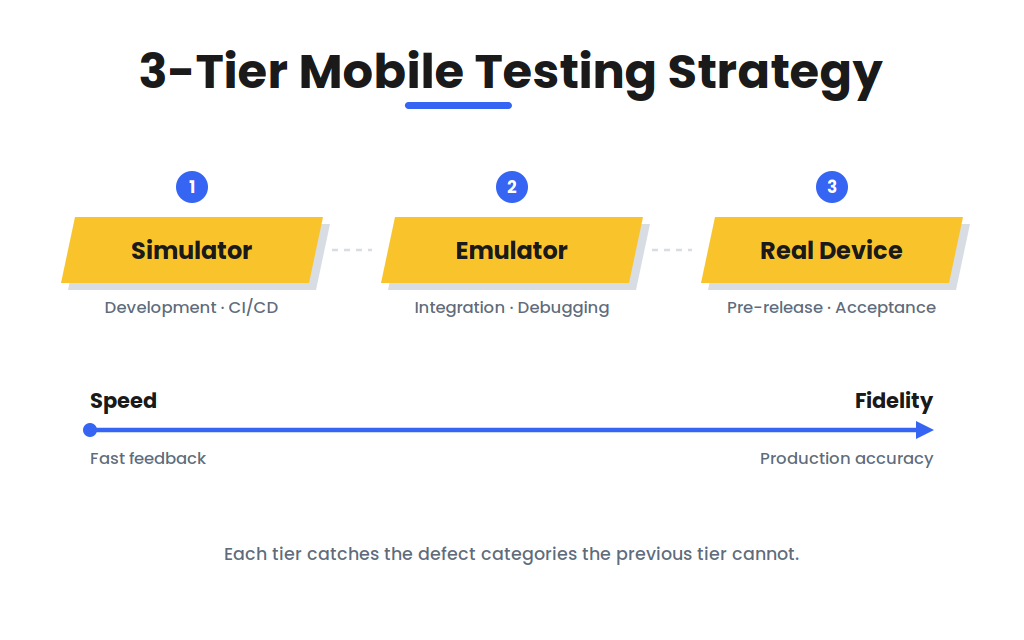
The tiered approach extends beyond tool choice into coverage planning. Planning across screen sizes, OS versions, and hardware tiers belongs to Compatibility Testing. Compatibility testing defines the matrix that real device execution then validates.
Testscenario maintains an in-house real device lab covering Android and iOS hardware tiers. Cloud platforms supplement the lab for long-tail models.
Our Mobile App Testing engagements combine real device execution, interrupt scenario coverage, and performance profiling on representative hardware. Clients in travel tech, edtech, and SaaS receive device matrices built from their own user analytics. Every defect report documents the exact model and OS version.

 18 Feb 2025


